Logo
  • 功能
  • 定价
  • 支持
  • 联系
  • 博客
  • 电子发票
  • 关于
  • 集成
  • API
  • 关于 集成 API
  • 登录
    会计
    销售点(POS) 工单
Warning! Payment is due for the implementation of this System. Please refer to the Product Detail page.
Warning!

How and when to delete or void sales invoice in Treezsoft?

发布者  selena  于  Dec 13 2017 15:04        3432


Sometimes you may realize you've mistakenly created a sales invoice, be it duplicated or its cancelled after its issued. You may want to delete the targeted sales invoice in your account with TreezSoft cloud accounting software. 

Please note that you cannot delete any documents or records if your GST mode is activated. This is to be compliance to the rules and regulations of GST. 

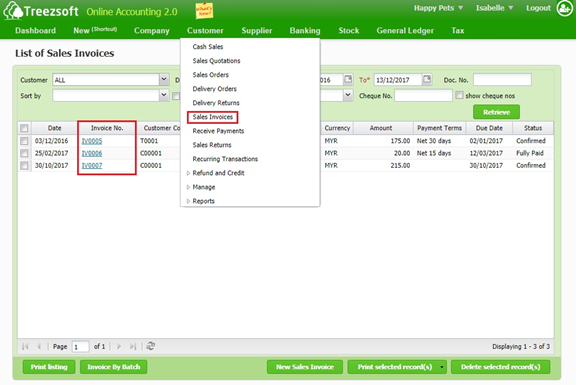
To delete or void sales invoice, navigate through: Customer > Sales Invoices. Click on the hyperlinked Invoice No. that you want to delete or void.
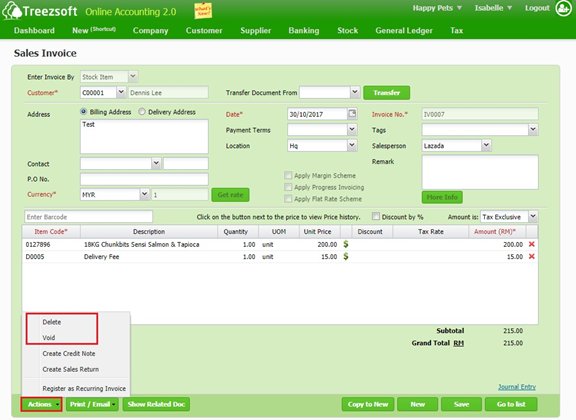
Click on Action >"Delete" or "Void" to delete or void the sales invoice.
When to delete or void an invoice?

This depends entirely on the accountant and the business operations, some businesses do not allow any deletion of invoices to maintain a proper audit trail of invoices.

Another typical interpretation would be to only delete if the invoice has not been sent to your customer and void, if it has been sent out.

You can read more on invoices in TreezSoft by visiting these links: 

  • How to create cash sales/simplified tax invoice?

  • How to create or edit receive payment as invoice receipt in Treezsoft?

  • How to enter my opening balance? - Historical Invoices (2/5)

TreezSoft is a cloud accounting software for Small and Medium-sized Enterprises (SMEs). It allows you to access your financial information anytime, anywhere. It also allows you to have unlimited users for FREE for your account in TreezSoft. Our aim is to help reduce our clients' time spent on accounting mainly by using our automated processes and integration to help increase their company effeciency at a minimum costs. SMEs can use TreezSoft to keep track their expenses, accounts, daily operation e.g. Point of Sales (namely QPOS) system and etc. 

Visit TreezSoft at http://www.treezsoft.com/ to sign up for a 30 days trial account with us! 

You can also email us at [email protected] for more enquiries


关键词 sales invoice

最近

Why Treezsoft is the Ideal Cloud Accounting Solution for IFRS-Adopting Countries 创建合并电子发票的简单步骤 How to Assign eInvoice Classification Code Invoicing for Optical Business Boost Efficiency & Control with Treezsoft’s Sales Person Setup Feature

相关

Getting started with Progress Invoicing in TreezSoft How to register overpayment/underpayment from customers How to customize document template (For Sales Invoice only)? How to import invoice listing? Invoicing Is Now Available in TreezSoft Mobile App! How to Record Machine or Device that Rent to Customer How to enter Withholding Tax in TreezSoft When to Enter Transactions as Historical Transactions and Current Transactions? Having mistakes on invoicing again? How to create partial refund for fully paid invoice? (With GST) Functionality of customer module in Treezsoft 创建合并电子发票的简单步骤 Invoicing and accounting for jewelry companies Invoicing for Contractor Invoicing for Optical Business How to import list of historical customer invoices from template in Treezsoft? How to create cash sales/simplified tax invoice? How to issue full tax invoice? How to create refund for fully paid invoice? (With GST) How to create a sales invoice with 2 or more different delivery orders (D.O) in Treezsoft? How to Issue and Modify Invoices in Mobile App? 电子发票 - 简单创建和更新标准发票和自开发票 - Treezsoft 博客 Why after I set my document number to editable, I still unable to edit the document number when issuing sales invoice? How to create an Auto-Billing (Recurring Transaction)?
关于 关于
  • 关于我们

产品 产品
  • 电子发票
  • 功能
  • 价格

资源 资源
  • 支持
  • 博客
  • API
  • 常见问题

订阅我们 订阅我们
  • 注册
  • 联系我们

  
 [email protected]
 +6012-787 5077
  • playstore
Logo
© 版权所有 - TreezSoft.com。保留所有权利。
营业时间:周一至周五 9am-5pm 使用条款    |    隐私  |    网站地图

Alert Message

0%

Confirm Message