What is an invoice?
Invoice is a statement of the sum due for a list of goods sent or services provided. It is issued from a supplier to customers.
Tax invoice is a standard format of invoice required under the GST system. All companies registered under GST must issue Tax Invoices to their customers.
When to issue an invoice?
Suppliers issue an invoice as an official document to request payment and most invoices normally comes with a due date for clients to pay.
A tax invoice must be issued within 21 days fromt he time of supply (meaning, the date the services is provided or date of goods delivered).
Things to be included in an invoice
Here are the list of things to be included in an invoice:
- Names and address of customer and supplier
- Terms of payment
- Date
- Contact names
- Description of items purchased or services provided
- Invoice serial number
If you are registered under GST, the extra things to be included are:
- Total sale amount before GST
- Rate of tax (6%)
- Total GST charged
- Total sale amount including GST
- GST registration number of the registered company
Issuing an invoice in TreezSoft
Things to be included in an invoice is automatically generated by TreezSoft accounting system after you have entered your company,customer's profile and all the details for the invoice.
To issue full tax invoice, navigate through: Customer > Sales Invoices. Click on the “New Sales Invoice” button at the bottom right corner to create a new sales invoice or click on the hyperlinked Invoice No. that you want to issue full tax invoice.
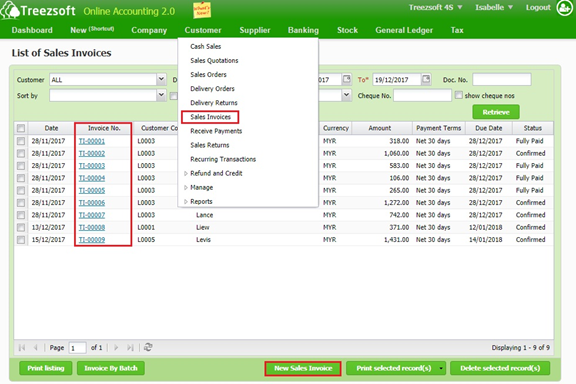
Retrieve - enter you criteria and click on the “Retrieve” button to search.
Print selected record(s) - Allows you to print multiple orders. Orders are printed in PDF formats where you can send via email or send to your printer.
Delete selected record(s) - Delete a selected record.
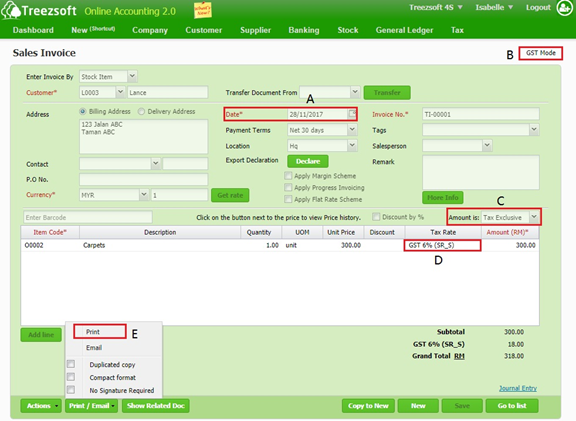
A - Select Date of invoice.
B - Observe whether it is in GST Mode.
C - Determine whether amount is Tax Exclusive or Tax Inclusive.
D - Charge your item with appropriate Tax Rate.
E - Save first and then Print your full tax invoice.
Note: If you try to issue invoice with invoice date is out of your company GST commence and cease date, the indicator GST Mode would disappear and you are not allowed to charge GST.
You can read more on invoice in TreezSoft by visiting these links:
TreezSoft is a cloud accounting software for Small and Medium-sized Enterprises (SMEs). It allows you to access your financial information anytime, anywhere. It also allows you to have unlimited users for FREE for your account in TreezSoft. Our aim is to help reduce our clients' time spent on accounting mainly by using our automated processes and integration to help increase their company effeciency at a minimum costs. SMEs can use TreezSoft to keep track their expenses, accounts, daily operation e.g. Point of Sales (namely QPOS) system and etc.
Visit TreezSoft at http://www.treezsoft.com/ to sign up for a 30 days trial account with us!
You can also email us at [email protected] for more enquiries.