What is GRN?
GRN refers to goods received note. A GRN is issued by the customer when they have received the goods delivered to them. This document includes the types of goods and the quantities received by the customer. It will be used to match with purchase order when issuing invoices and when customers received the invoice. In most of the case, the invoice will be paid only when the details on the three documents matched.
GRN in TreezSoft
TreezSoft cloud accounting software uses automation and integration to ensure accurate and updated records for our users at all time. You can easily create a GRN in TreezSoft in just a few clicks. You can even transfer your purchase orders when creating a GRN for it. After transferring, you can even adjust the stocks quantity and types in the GRN if there is any difference.
To create a new goods received notes, navigate through: Supplier > Goods Received Notes. Click on the “New Goods Received Note” button at the bottom right corner.

Retrieve - Enter you criteria and click on the “Retrieve” button to search.
Delete selected record(s) - Delete a selected record.
Enter the details and click on "Save" to confirm and proceed.
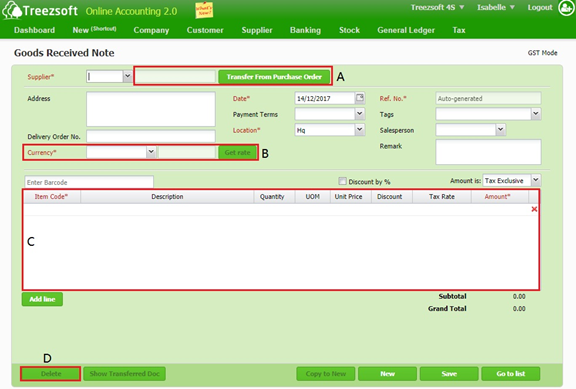
A - You can transfer the statement from P.O.
B - If your statement is issued under a different currency, you can get the latest rates from Google finance, by clicking the Get rate button.
C - You can add the items/services you had received here. Add line to add additional items/services. Use the Red cross to remove an unwanted item/service.
D - You are able to delete or show where your statement is transferred from.
Fields marks with asterisk (*) are required fields.
You can visit these links to read more about supplier modules in TreezSoft:
TreezSoft is a cloud accounting software for Small and Medium-sized Enterprises (SMEs). It allows you to access your financial information anytime, anywhere. It also allows you to have unlimited users for FREE for your account in TreezSoft. Our aim is to help reduce our clients' time spent on accounting mainly by using our automated processes and integration to help increase their company effeciency at a minimum costs. SMEs can use TreezSoft to keep track their expenses, accounts, daily operation e.g. Point of Sales (namely QPOS) system and etc.
Visit TreezSoft at http://www.treezsoft.com/ to sign up for a 30 days trial account with us!
You can also email us at [email protected] for more enquiries