QPOS is a point of sales system that is integrated with TreezSoft cloud accounting software. It is a tool the simplify retail sales procedures. Retailer uses point of sales system to record every sales of the day.
Some retailer provides membership system to enhance their sales and to provide benefits or discounts for regular customers.
TreezSoft's QPOS system is ready to cater for such needs. You just have to set up the types of membership and benefits that follows into our system once, and it will be automatically integrated to all your sales. Later on, you just have to click on the type of membership the person is entitled to and the respective discounts will automatically be applied.
To set up inclusion and exclusion criteria for discoutns according to membership types, simply navigate through: Customer > Membership Type.
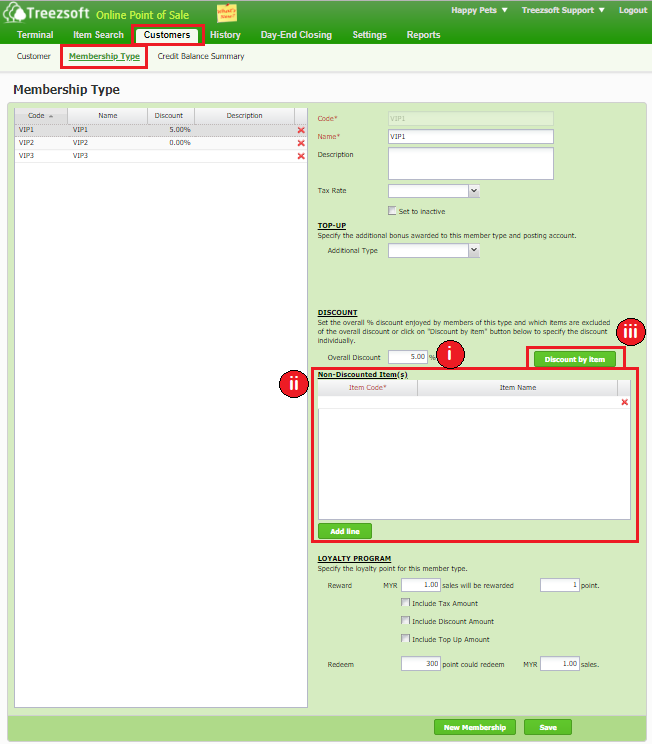
i. Enter the Overall Discount percentage that you would like to assign for that membership type.
ii. Enter the item(s) that you would like to be defined as Non-Discounted Item(s). Click on Add Line to add more item to be excluded from the discount. Click on the
Red Cross to delete the item from the list.
iii. Click on Discount by Item if you would only want to apply the discount on certain item.
When you click on Discount by Item, the screen below will appear. Follow the steps below to include/exclude item(s) from discount:
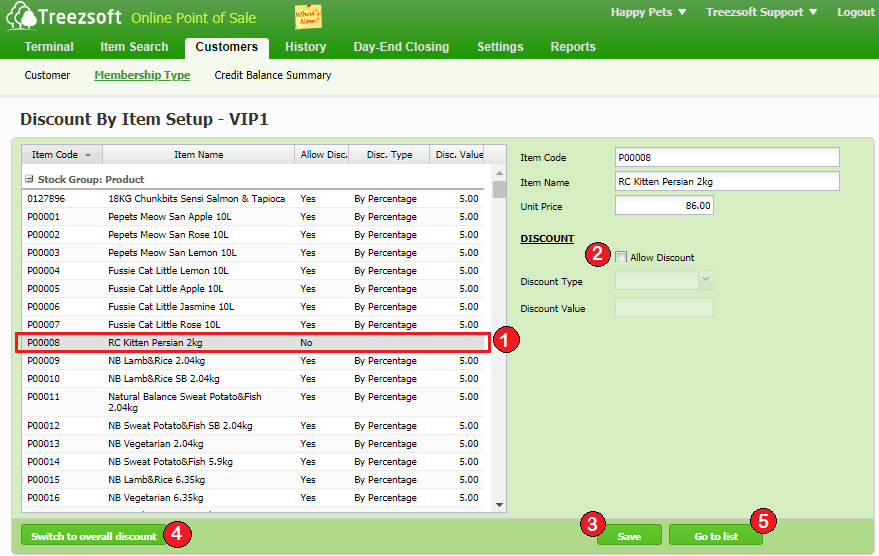
1. To exclude item, choose the item to be excluded here.
To include item, choose the item to be included here.
2. Untick the 'Allow Discount' box to exclude the item for discount.
Tick the 'Allow Discount' box to include the item for discount.
3. Click on Save to save the record.
4. Click on Switch to Overall Discount to switch back to apply discount on overall item.
5. Click on Go to List to go back to previous page.
You can read more on QPOS in TreezSoft by visiting these links:
TreezSoft is a cloud accounting software for Small and Medium-sized Enterprises (SMEs). It allows you to access your financial information anytime, anywhere. It also allows you to have unlimited users for FREE for your account in TreezSoft. Our aim is to help reduce our clients' time spent on accounting mainly by using our automated processes and integration to help increase their companyeffeciency at a minimum costs. SMEs can use TreezSoft to keep track their expenses, accounts, daily operation e.g. Point of Sales (namely QPOS) system and etc.
Visit TreezSoft at http://www.treezsoft.com/ to sign up for a 30 days trial account with us!
You can also email us at [email protected] for more enquiries.