In daily business operation, there may be times that you've overpaid your supplier or you will have to off-set against the unapplied amount for supplier payment and credit notes. In such cases, you will need to record those amount as refund made by your supplier in your TreezSoft cloud accounting account.
To create a new supplier refunds, simply navigate through: Supplier > Refund and Credit > Supplier Refunds. Click on the “New Supplier Refund” button at the bottom right corner.
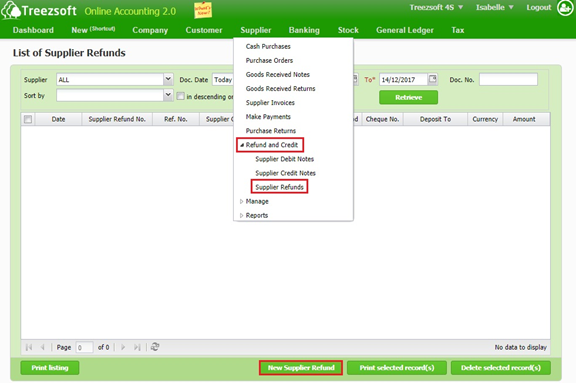
Retrieve - Enter you criteria and click on the “Retrieve” button to search.
Print selected record(s) - Allows you to print multiple orders. Orders are printed in PDF formats where you can send via email or send to your printer.
Delete selected record(s) - Delete a selected record.
Enter the details and click on "Save" to confirm and proceed.
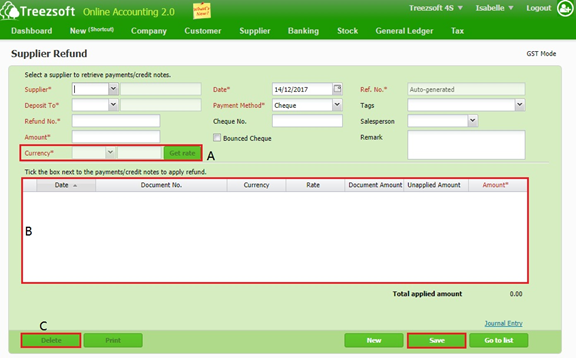
A - If the credit note is issued under a different currency, you can get the latest rates from Google finance, by clicking the Get rate button.
B - Mark a tick next to the refund received to apply the refund.
C - To delete the record.
Fields marks with asterisk (*) are required fields.
You can visit these links to read more about supplier modules in TreezSoft:
TreezSoft is a cloud accounting software for Small and Medium-sized Enterprises (SMEs). It allows you to access your financial information anytime, anywhere. It also allows you to have unlimited users for FREE for your account in TreezSoft. Our aim is to help reduce our clients' time spent on accounting mainly by using our automated processes and integration to help increase their company effeciency at a minimum costs. SMEs can use TreezSoft to keep track their expenses, accounts, daily operation e.g. Point of Sales (namely QPOS) system and etc.
Visit TreezSoft at http://www.treezsoft.com/ to sign up for a 30 days trial account with us!
You can also email us at [email protected] for more enquiries