Functionality of company module in Treezsoft
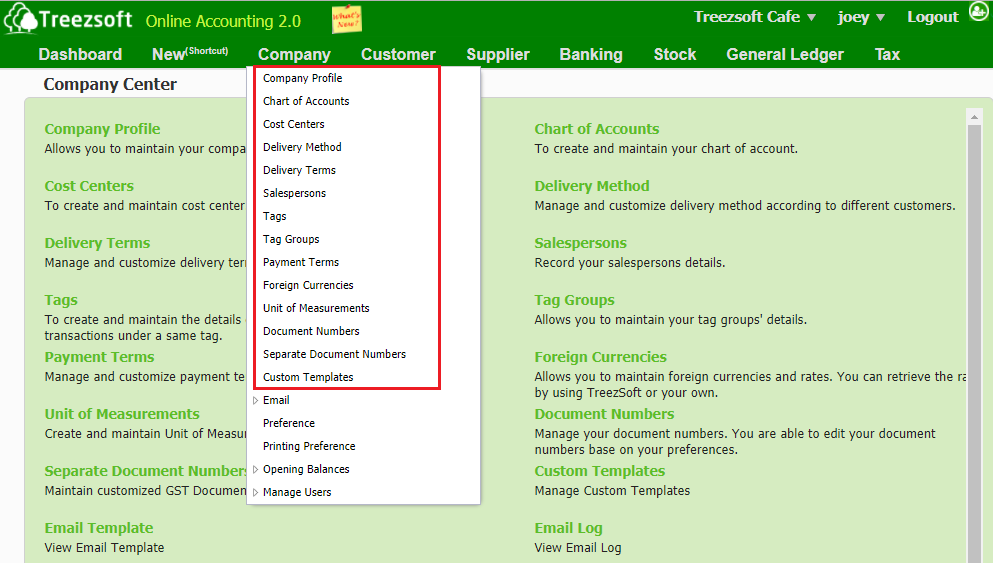
Company Profile
Allows you to manage and update your company details. (eg. company name, logo, address, commence date, MISC code, etc.)
Chart of Account
You can create and manage your chart of accounts, including the asset, liabilities, revenue, expenses, and the equity of your company in this module.
Cost Centers
You can create and maintain your cost center in this module.
Delivery Method
Allows you to manage and customize the delivery method to different customers based on their preferences.
Delivery Terms
Allows you to manage and customize delivery terms to different customers based on their preferences.
Salespersons
You can record your salesperson details and their user id in this module.
Tags
Allow you to create and manage your tag details for better organizing your financial transactions. (eg. Event A, Project B, Party, etc.)
Tag Groups
Allow you to group your tags together and manage the details. (eg. tag group for Event include Event A, Event B, and Event C)
Payment Terms
Allow you to manage and customize payment terms to different customers. (eg. due on receipt, net 15 days, net 30 days, etc.)
Foreign Currencies
Allows you to set up different foreign currencies that your company uses. (eg. RM - Ringgit Malaysia, US$ -US Dollar, S$ - Singapore Dollar, etc.)
Unit of Measurements
Allow you to create and manage the unit of measurements for different stocks/goods. (eg. kg - kilogram, ltr - litre, dz - dozen, etc.)
Document Numbers
Allow you to set and manage your document numbers by editing the prefix codes based on your own preferences. (eg. DO - Delivery Order, CP - Cash Payments, PO - Purchase Order, etc.)
Separate Document Numbers
Allow you to manage and customize different document numbers for different locations/ for specific purposes based on your preferences. (eg. cash sales code for branch is "cs", while cash sales code for Hq is "CSA", etc.).
Custom Templates
Allow you to create and manage your own templates in Treezsoft.
You can read more on company module in TreezSoft by visiting these links:
TreezSoft is a cloud accounting software for Small and Medium-sized Enterprises (SMEs). It allows you to access your financial information anytime, anywhere. It also allows you to have unlimited users for FREE for your account in TreezSoft. Our aim is to help reduce our clients' time spent on accounting mainly by using our automated processes and integration to help increase their company effeciency at a minimum costs. SMEs can use TreezSoft to keep track their expenses, accounts, daily operation e.g. Point of Sales (namely QPOS) system and etc.
Visit TreezSoft at http://www.treezsoft.com/ to sign up for a 30 days trial account with us!
You can also email us at [email protected] for more enquiries