Logo
  • Ciri-ciri
  • Harga
  • Sokongan
  • Hubungi
  • Blog
  • E-Invois
  • Tentang
  • Integrasi
  • API
  • Tentang Integrasi API
  • Log Masuk
    Perakaunan
    Poin Jualan (POS) Pesanan Kerja
Warning! Payment is due for the implementation of this System. Please refer to the Product Detail page.
Warning!

How to Insert Tourism tax on top of GST?

Diterbitkan Oleh  selena  pada  Dec 05 2017 11:10        3162


In Malaysia, tourism tax is a fixed tax (RM10.00) imposed on tourism sector by the government. Since the tourism tax is a fixed price, there are two ways that TreezSoft cloud accounting software you can enter the tourism tax with: treat it as a stock item or account only. Which strategy you would like to use depends on how you are going to issue your invoice in (either for account only or stock involved)

1st strategy: Stock item

Step 1: To create a new account, navigate through: Company > Chart of Accounts. Click “New Account” button at the bottom right corner.
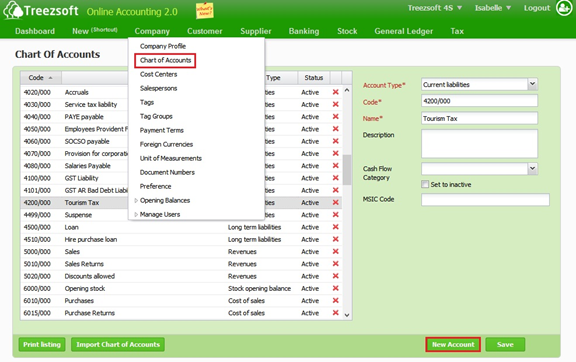
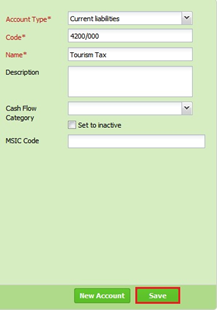
Enter the account detail as below. Click “Save” button once you have done.
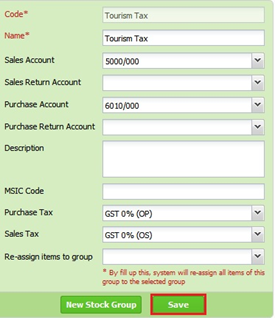
Step 2: Create a new Stock Group “Tourism Tax” and link both sales and purchase account to above account, and set “OS” to Sales Tax, “OP” to Purchase Tax, navigate through: Stock > Manage > Stock Groups. Click “New Stock Group” button at the bottom right corner.
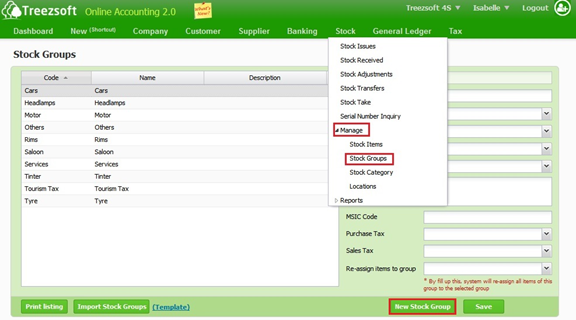
Enter the stock group detail as below. Click “Save” button once you have done.
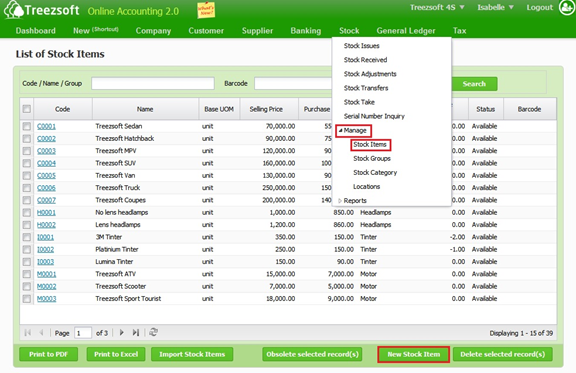
Step 3: To create new item “Tourism Tax”, and linked with above Stock Group, navigate through: Stock > Manage > Stock Items. Click “New Stock Item” button at the bottom right corner.
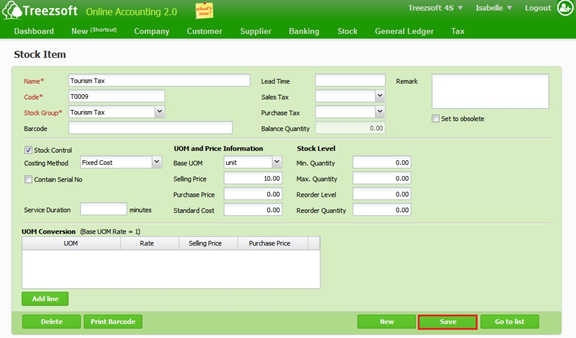
Enter the stock item detail as below. Click “Save” button once you have done.
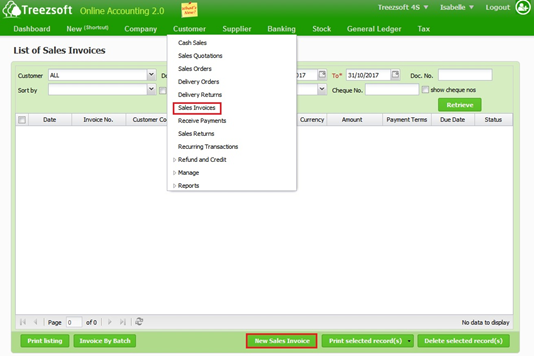
Step 4: When creating invoice, always insert it as new line, navigate through Customer > Sales Invoices. Click “New Sales Invoice” button at the bottom right corner.
Enter the details and click on “Save” button once you have done.
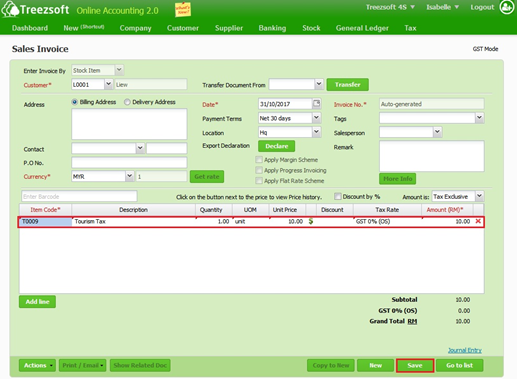
Note: Remember to set the GST as “OS”. (out of scope sales)

2nd strategy: Charging to account only

If you are going to charge invoice directly to account only, then just need to complete step 1 and jump straight to step 4.

You can read more on invoicing in TreezSoft by visiting these links: 

  • What is the difference between enter invoice by Stock Item and Account?

  • How to create Supplier Invoice?

  • How to create cash sales/simplified tax invoice?

  • How to issue Self-billed Tax Invoice?

TreezSoft is a cloud accounting software for Small and Medium-sized Enterprises (SMEs). It allows you to access your financial information anytime, anywhere. It also allows you to have unlimited users for FREE for your account in TreezSoft. Our aim is to help reduce our clients' time spent on accounting mainly by using our automated processes and integration to help increase their company effeciency at a minimum costs. SMEs can use TreezSoft to keep track their expenses, accounts, daily operation e.g. Point of Sales (namely QPOS) system and etc. 

Visit TreezSoft at http://www.treezsoft.com/ to sign up for a 30 days trial account with us! 

You can also email us at [email protected] for more enquiries.


Kata Kunci tourism tax gst insert

Terkini

Mengapa Treezsoft adalah Penyelesaian Perakaunan Awan yang Ideal untuk Negara-Negara yang Mengamalkan IFRS Langkah Mudah untuk Membuat Konsolidasi e-Invois Cara Menetapkan Kod Klasifikasi eInvois Pengeluaran Invois untuk Perniagaan Optik Boost Efficiency & Control with Treezsoft’s Sales Person Setup Feature

Berkaitan

What are the things I need to consider for back date transactions? What is MSIC code? Guide to financial year end closing How to generate and download the GST Audit File (GAF)? Why is deleting/void/cancelling of records are not allowed in GST? How to issue Bad Debt Recover for purchase? How to enter transactions that is deferred in GST declaration? Treezsoft Updates - GST Rate Update How to record payment made or received for GST? What is happening to taxes in Malaysia? - GST vs SST Changing from GST 6% to GST 0% How to issue Bad Debt Recovery for Sales? How to register, activate and verify the GST function in Treezsoft? How to generate and submit GST Return? How to create Credit Note for Cash Sales? How to issue Bad Debt Relief for Purchase? How to record payment or refund claim for GST? How to print Lampiran 2 in Treezsoft? How to set up GST in Treezsoft? How to record Gift Given? How to issue Bad Debt Relief for Sales? GST tax inclusive calculation for Credit Note How to edit or delete your payments? How to create advance payment or deposit (with GST) in TreezSoft? How to view GST Related Account Code and GST code in Treezsoft? How to declare GST for delivery order (D.O) which tax invoice is not issued within 21 days from the delivery order date?
Tentang Tentang
  • Tentang Kami

Produk Produk
  • E-Invois
  • Ciri-ciri
  • Harga

Sumber Sumber
  • Sokongan
  • Blog
  • API
  • Soalan Lazim

Langgan Kami Langgan Kami
  • Daftar
  • Hubungi Kami

  
 [email protected]
 +6012-787 5077
  • playstore
Logo
� Hak Cipta - TreezSoft.com. Semua hak cipta terpelihara.
Waktu Operasi: Isnin-Jumaat 9am-5pm Terma Penggunaan    |    Privasi  |    Peta Laman

Alert Message

0%

Confirm Message