Logo
  • 功能
  • 定价
  • 支持
  • 联系
  • 博客
  • 电子发票
  • 关于
  • 集成
  • API
  • 关于 集成 API
  • 登录
    会计
    销售点(POS) 工单
Warning! Payment is due for the implementation of this System. Please refer to the Product Detail page.
Warning!

电子发票 - 简单创建和更新标准发票和自开发票 - Treezsoft 博客

发布者  selena  于  Dec 19 2024 15:15        6588


高效管理发票是确保在当今快节奏的商业世界中保持组织性和合规性的关键。Treezsoft使得电子发票管理变得简单明了,帮助企业轻松创建、更新、取消和跟踪电子发票。本指南将带您了解在Treezsoft中处理电子发票的基本步骤,无论是开标准发票、自己开的发票,还是处理更新和取消操作。我们还将介绍如何访问电子发票记录,并确保您的配置始终保持最新。通过这些最佳实践,您将能够自信地管理电子发票,确保一切顺利运行。

基本流程:

1. 电子发票创建流程

步骤 1:获取客户信息

步骤 2:开发票/贷记单(CN) /借记单(DN)

步骤 3:点击创建电子发票

2. 电子发票更新流程

步骤 1:确保记录在72小时内创建

步骤 2:更新发票/贷记单(CN) /借记单(DN)

步骤 3:点击更新电子发票

3. 电子发票取消流程

步骤 1:确保记录在72小时内创建

步骤 2:点击取消电子发票

步骤 3:作废/取消/删除发票/贷记单(CN) /借记单(DN)

4. 更新电子发票设置

步骤 1:检查是否新增了项目、单位、支付方式。

步骤 2:在整合> 电子发票中更新设置。


开标准电子发票步骤

1. 按照正常流程开发票,确保所有必要的细节都已包括。

2. 确认客户的税号(TIN)和ID已在系统中设置。

3. 点击界面右上角的"E-Invoice"按钮。
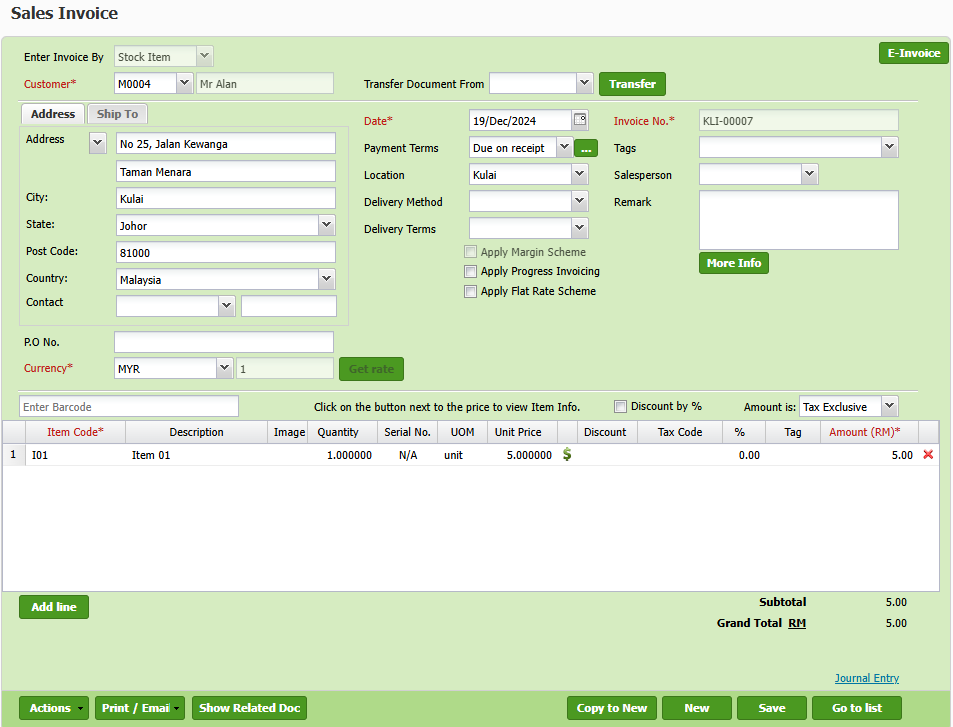
4. 点击“Submit for eInvoice”按钮以开电子发票。 

5. 查看电子发票状态以确认提交是否成功。如果在验证过程中发现错误,请及时更新发票中的必要信息进行修正。
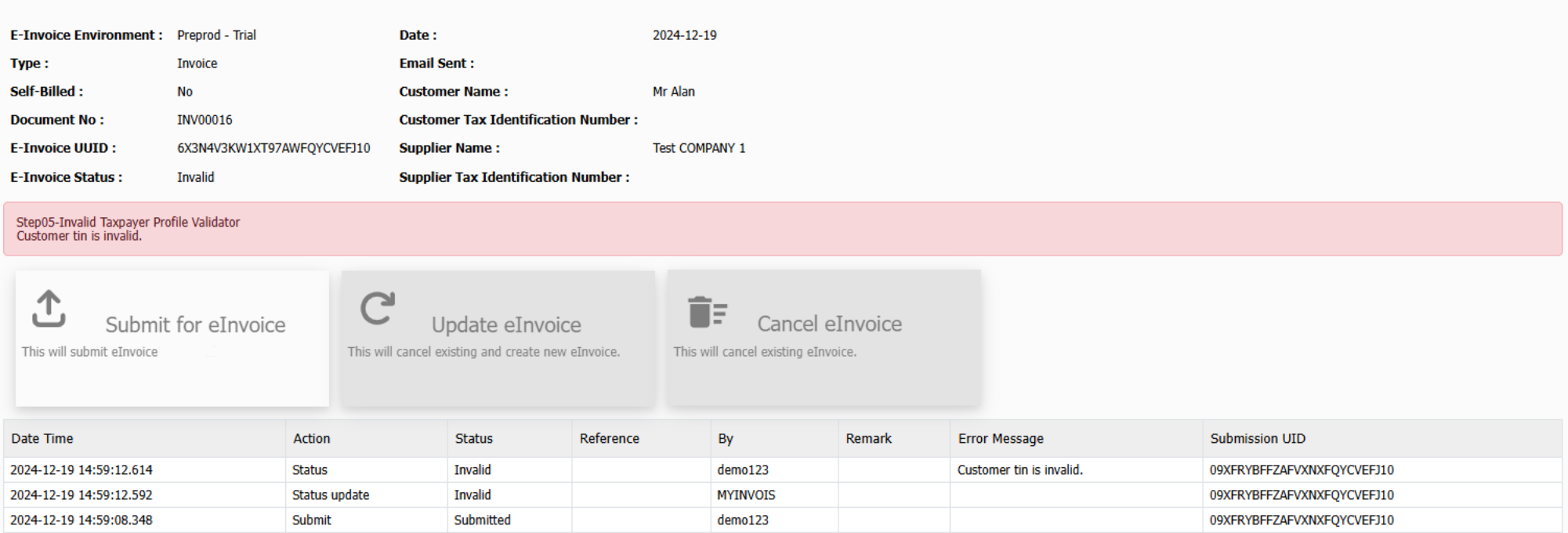
6. 修正后,使用相同的“Submit for eInvoice”按钮重新提交电子发票。

7. 确认状态更改为“Valid”,表示电子发票已成功处理。
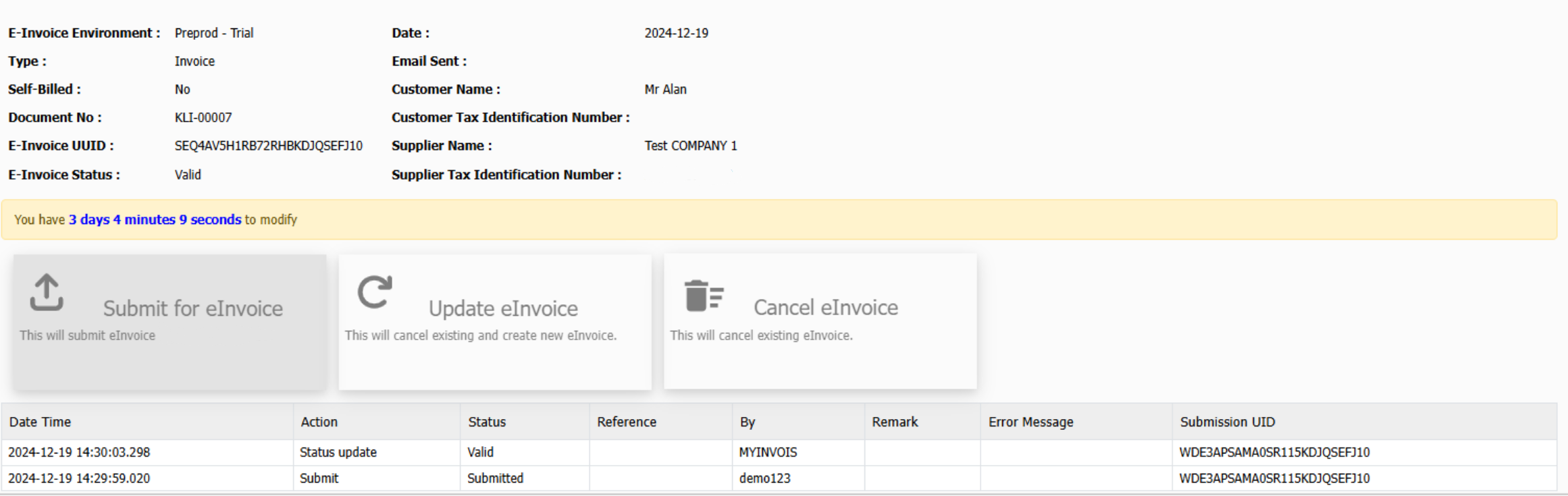
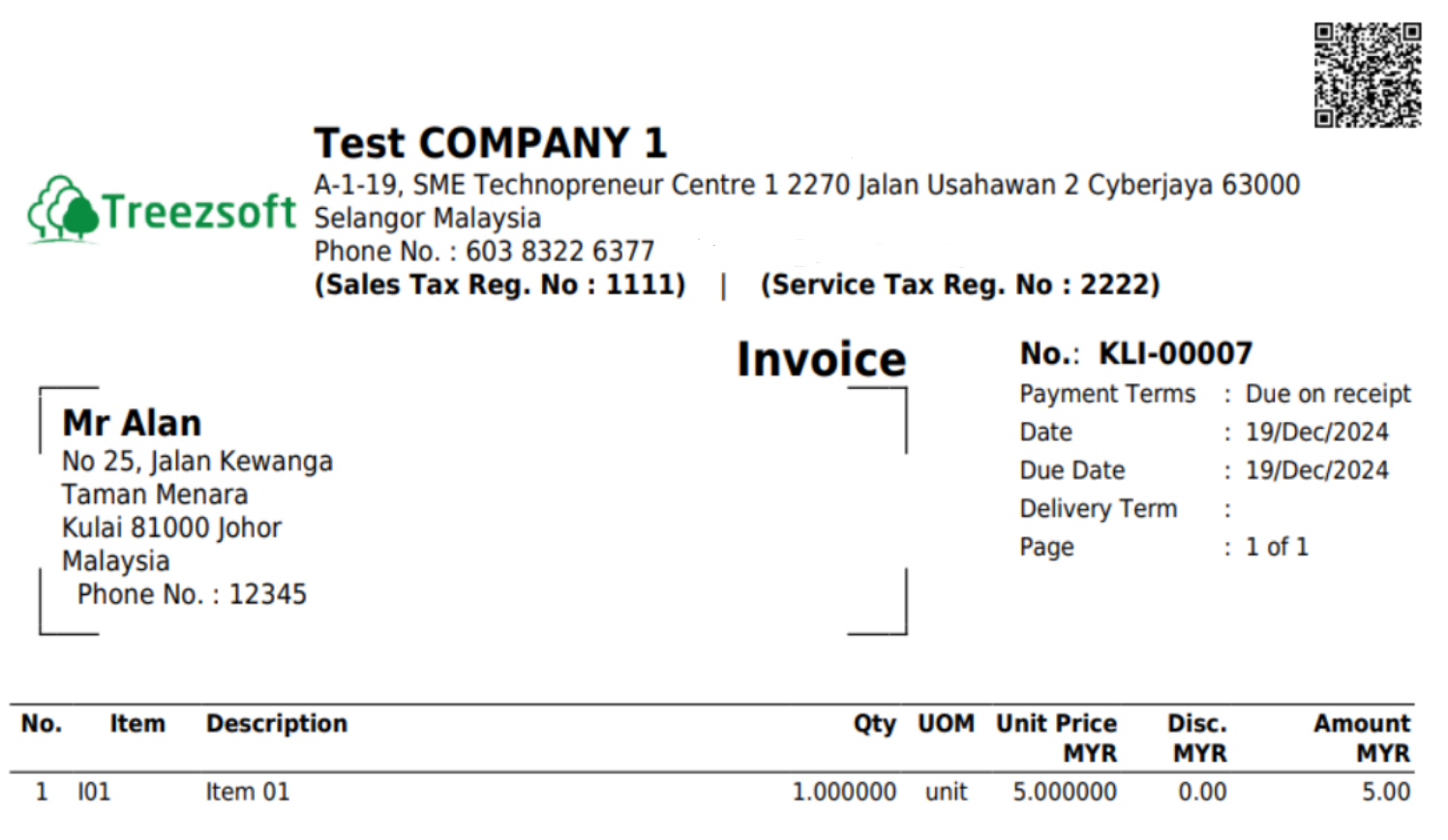
8. 一旦电子发票是有效,打印发票以备存档。

9. 发票上将包含二维码,客户可以扫描并验证电子发票。

10. 将最终发票与客户共享 
如果在72小时内有任何更改,您可以按照以下步骤操作:

1. 按照正常流程更新并保存发票。

2. 点击界面右上角的"E-Invoice"按钮,系统将引导您到电子发票页面。

3. 在电子发票页面,选择“Update eInvoice”以触发现有电子发票记录的更新。

4. 检查电子发票状态,确保更新已正确处理。如有错误,请通过修正信息并在必要时重新提交更新。

5. 一旦状态显示为“Valid”,将更新后的发票与客户共享。

注意:更新电子发票将自动取消现有电子发票,并生成一个新的电子发票以反映更改。
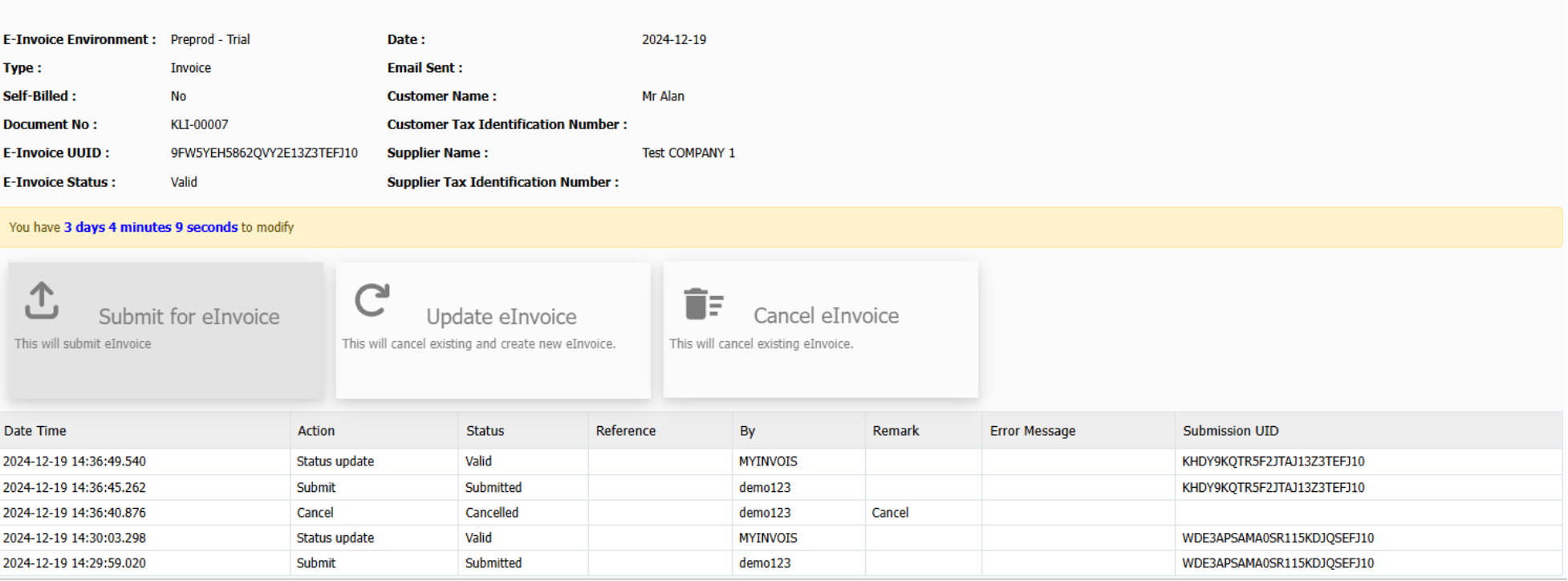
按照类似步骤开标准电子发票: 

  • 现金销售(Cash Sales)
  • 销售退货(Sales Return)、贷记票据(Credit Note)
  • 借方票据(Debit Note)


开自开(Self-billed)电子发票的步骤

1. 按照通常方式准备供应商发票,确保所有必要的细节准确无误。

2. 验证供应商的纳税人识别号(TIN)和ID是否已在系统中正确设置。

3. 确认勾选“Self-Billed eInvoice”。

4. 点击屏幕右上角的“E-Invoice"按钮,系统将自动将您重定向到电子发票提交页面。
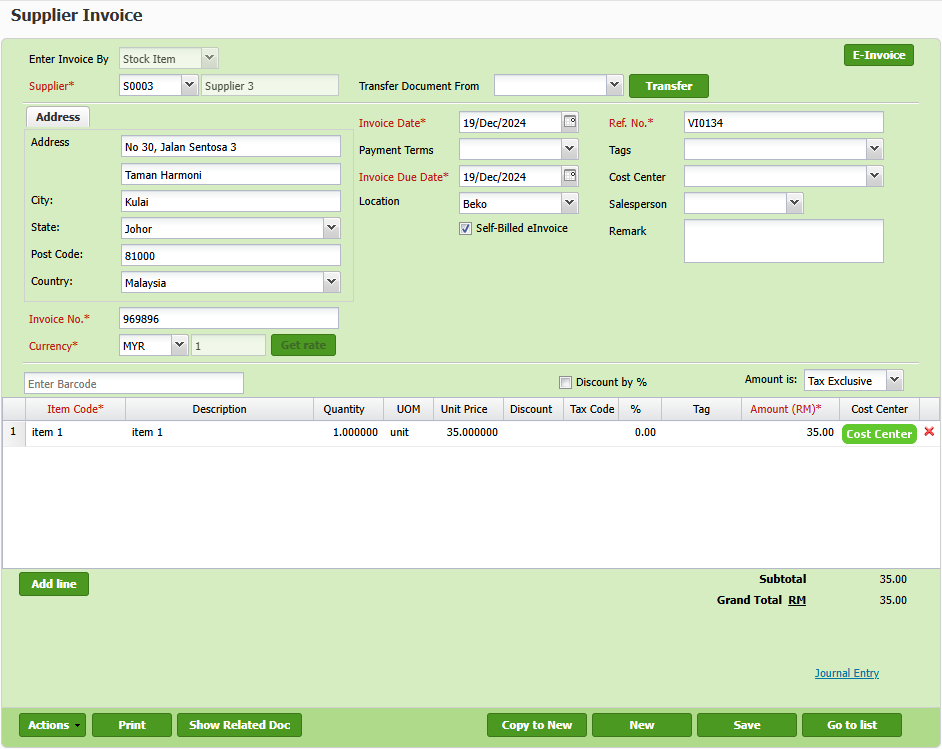
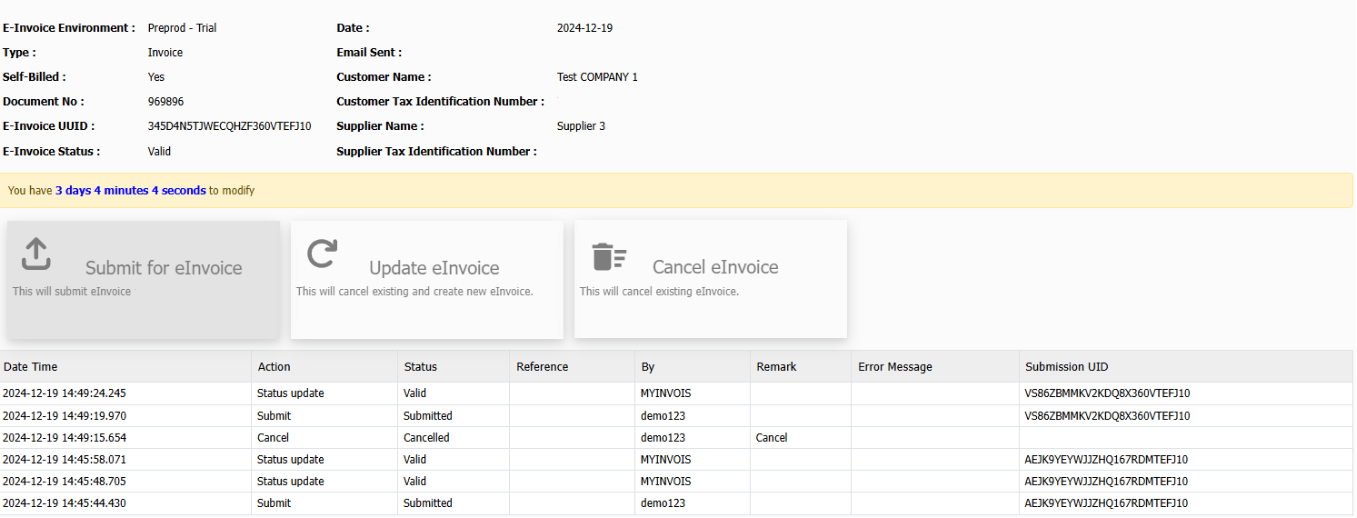
5. 在电子发票页面,点击“Submit for eInvoice”按钮以启动电子发票的生成和提交过程。

6. 审查电子发票状态,确认提交是否成功。如果在验证过程中发现错误,及时更新发票中的必要信息并进行修正。
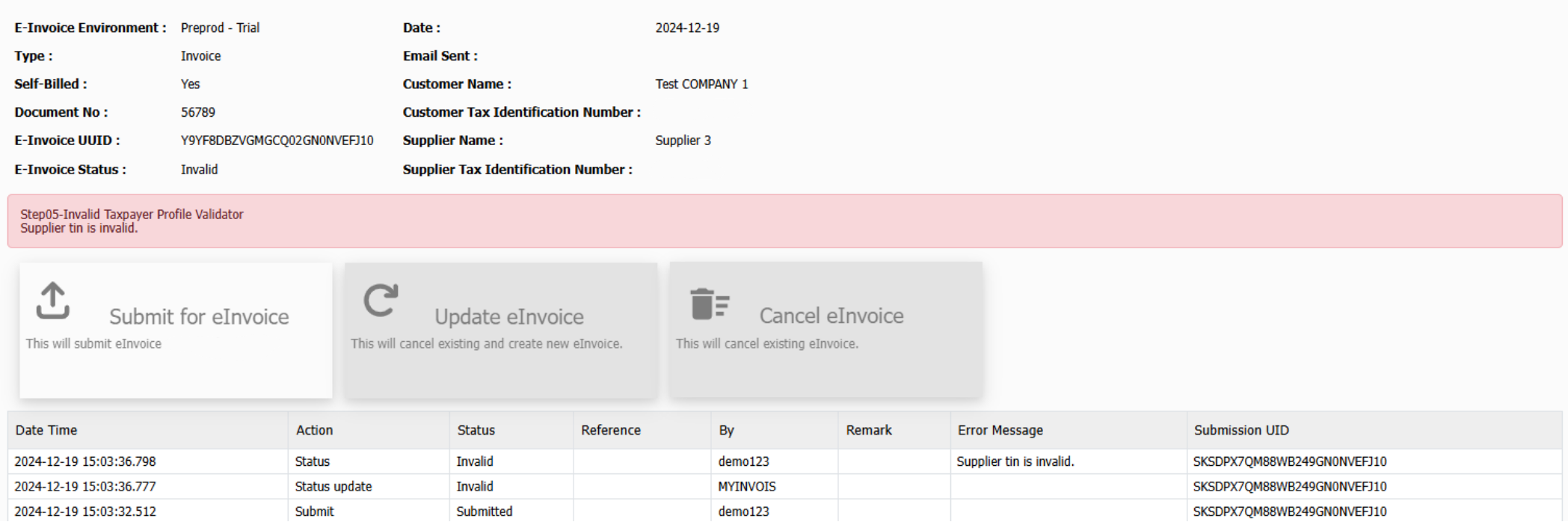
7. 修正后,再次点击“Submit for eInvoice”按钮以重新提交更新后的电子发票。

8. 如果没有发现其他错误,系统将显示“Valid”状态,表示电子发票已成功处理。
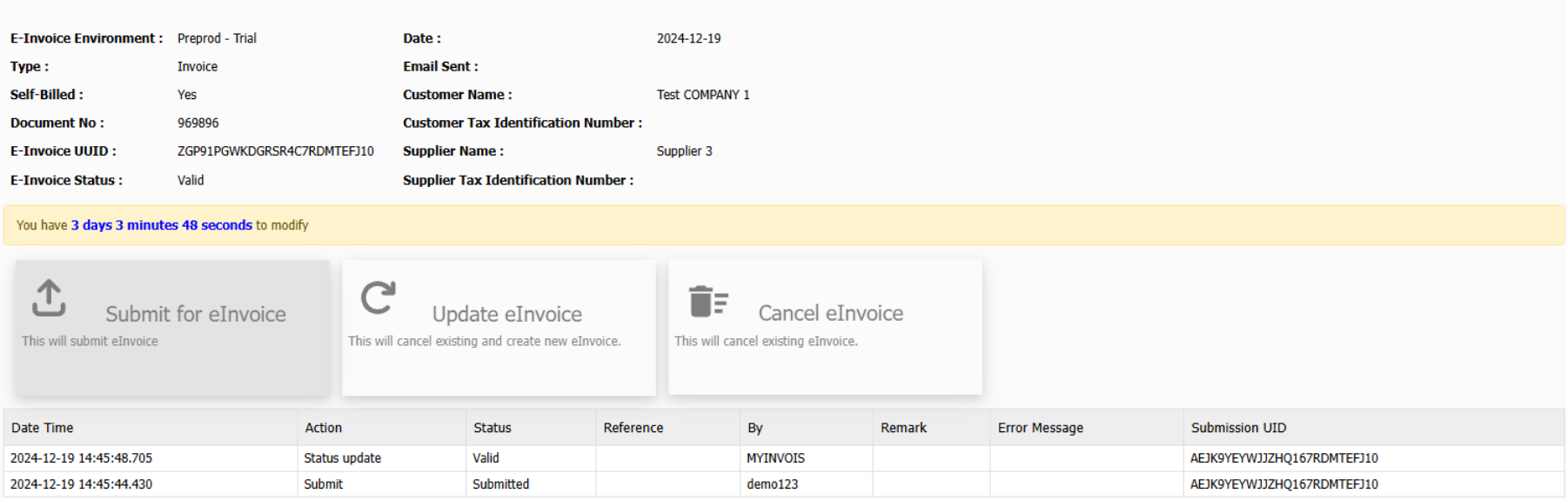
如果在72小时内进行了任何更改,请按照以下步骤操作:

1. 正常更新并保存发票。

2. 点击右上角的“E-Invoice”按钮,系统将自动重定向到电子发票页面。
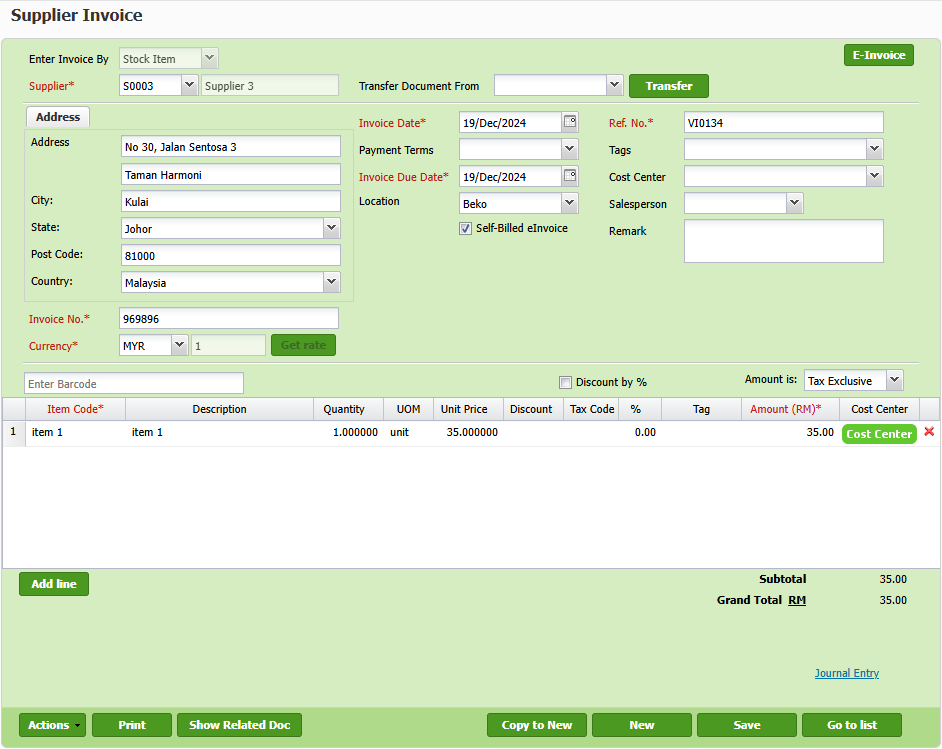
3. 点击“Update eInvoice”按钮以启动现有电子发票的更新过程。

4. 查看电子发票状态,确认更新是否成功处理。如果发现验证错误,请及时更正发票详细信息。

注意:更新电子发票将自动取消现有的电子发票,并生成一张新的发票以反映更改。
按照类似步骤自开(Self-billed)电子发票:

  • 现金采购(Cash Purchase)
  • 采购退货(Purchase Return)、供应商贷记单据(Supplier Credit Note)
  • 供应商借记单(Supplier Debit Note)


电子发票记录查询

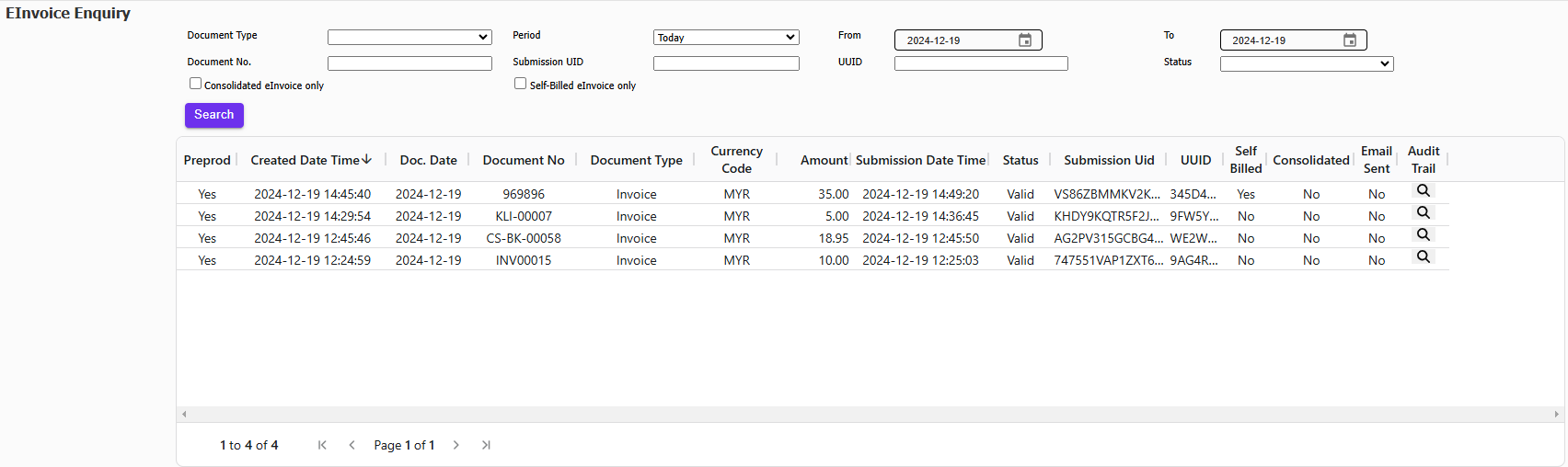
轻松查看所有已提交的电子发票及其相应状态。

1. 在菜单中选择“Tax > E-invoice > E-invoice Enquiry”以访问电子发票查询页面。

2. 使用可用的筛选器根据特定条件(如日期范围、客户详情或状态)缩小搜索结果。浏览筛选后的电子发票列表以查看详细信息。
 

更新电子发票配置

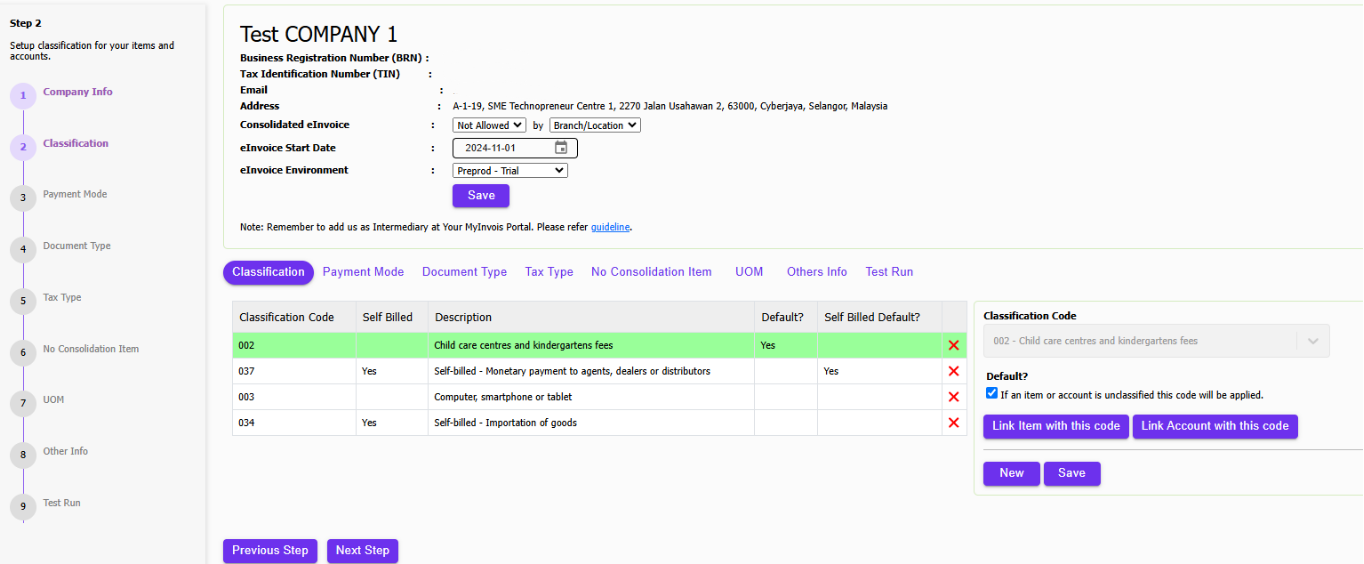
每当系统中新增项目、付款方式或计量单位(UOM)时,请确保更新电子发票整合,以便与电子发票设置保持一致。
采用 TreezSoft 云端会计

迎接数字化转型,选择 TreezSoft 云端会计,这是一款无缝兼容 LHDN 电子发票的解决方案。随着数字税务时代的到来,TreezSoft 云端会计已做好准备,帮助企业顺利过渡到 电子发票系统,提供强大且用户友好的软件解决方案。从 2023 年 8 月 1 日起,签购 TreezSoft 解决方案的客户将能免费使用电子发票,直至 2028 年,这充分体现了我们在经济高效税务合规方面的承诺。

迎接会计新时代

不要让您的业务落后。通过 TreezSoft 拥抱会计的未来。立即注册,成为首批体验我们高效便捷的电子发票功能的用户之一。通过 TreezSoft 云端会计,您不仅在跟随时代潮流,更是在引领潮流。

TreezSoft 是一款面向中小型企业(SME)的云端会计软件。您可以随时随地访问财务信息,并通过自动化流程和整合提升会计流程的效率和财务健康管理。您还可以在 TreezSoft 中为您的账户创建无限数量的用户,完全免费!

访问 TreezSoft 官网:http://www.treezsoft.com/ ,立即注册,免费试用 30 天!

关注我们的 Facebook 页面,获取更多最新资讯:https://www.facebook.com/TreezSoft

如有疑问,您也可以发送电子邮件至 [email protected] 与我们联系。


关键词 Treezsoft

最近

Why Treezsoft is the Ideal Cloud Accounting Solution for IFRS-Adopting Countries 创建合并电子发票的简单步骤 How to Assign eInvoice Classification Code Invoicing for Optical Business Boost Efficiency & Control with Treezsoft’s Sales Person Setup Feature

相关

开LHDN 合规电子发票,TreezSoft 云端会计是最佳选择 How to register overpayment/underpayment from customers Why I could not save Credit Note? How to create or edit supplier credit note? How to enable rounding adjustment (only for Cash Sales)? The advantages of choosing invoicing software over invoicing templates How to issue Self-billed Tax Invoice? Invoicing and accounting for jewelry companies Invoicing for Optical Business How to enter order in QPOS? How to create refund for fully paid invoice? (With GST) How to create an Auto-Billing (Recurring Transaction)? How does POS System benefit grocery stores? Why Treezsoft is the Ideal Cloud Accounting Solution for IFRS-Adopting Countries How to connect Price Pole with Treezsoft POS Getting started with Progress Invoicing in TreezSoft How to create Credit Note for Cash Sales? How to customize document template (For Sales Invoice only)? 马来西亚电子发票实施: 中小企业指南 How does an automated accounting grow your business? Registering as a Business Owner for Sole Proprietors in MyTax for E-Invoice Submission How to Record Machine or Device that Rent to Customer How to enter Withholding Tax in TreezSoft How to import credit note listing? Malaysia E-Invoice Implementation: A Guide for SMEs Functionality of customer module in Treezsoft Invoicing for Contractor Ways to use Treezsoft - The Service Industries How to import list of historical customer invoices from template in Treezsoft? Embrace the Future of Accounting with TreezSoft Cloud Accounting and E-Invoice How to create a sales invoice with 2 or more different delivery orders (D.O) in Treezsoft? 3 Ways TreezSoft Association Package Help Your Residential Association Why after I set my document number to editable, I still unable to edit the document number when issuing sales invoice? 如何在 MyInvois 门户将 TreezSoft 添加为您的电子发票中介机构 如何将物品条码直接打印到条码打印机? Record an overpayment on cash sales How do pharmacies maintain effective inventory management? [E-Invoice] 马来西亚LHDN电子发票计划 第1部分 TreezSoft电子发票启动指南 Why Treezsoft Cloud Accounting is the Best Choice for LHDN e-Invoice Compliance Tired of entering recurring expenses every time? When to Enter Transactions as Historical Transactions and Current Transactions? How to create partial refund for fully paid invoice? (With GST) 创建合并电子发票的简单步骤 How to create cash sales/simplified tax invoice? How to issue full tax invoice? How and when to delete or void sales invoice in Treezsoft? [E-Invoice] Malaysia LHDN E-Invoice Initiative Part 1 How to record Barter trades (stock exchange) in transaction? How to add Treezsoft as Intermediary at Your MyInvois Portal How to import invoice listing? How to activate Self-billed Tax Invoice? Invoicing Is Now Available in TreezSoft Mobile App! Having mistakes on invoicing again? GST tax inclusive calculation for Credit Note 利用 TreezSoft 云端会计和电子发票迎接会计的未来 TreezSoft eInvoice Onboarding and Configuration How to create refunds on cash sales? Understanding Disbursement and Reimbursement in LHDN E-Invoice QPOS: How to manage table number creation (layout) in Treezsoft? How to Issue and Modify Invoices in Mobile App? How to create or edit credit notes (CN)?
关于 关于
  • 关于我们

产品 产品
  • 电子发票
  • 功能
  • 价格

资源 资源
  • 支持
  • 博客
  • API
  • 常见问题

订阅我们 订阅我们
  • 注册
  • 联系我们

  
 [email protected]
 +6012-787 5077
  • playstore
Logo
© 版权所有 - TreezSoft.com。保留所有权利。
营业时间:周一至周五 9am-5pm 使用条款    |    隐私  |    网站地图

Alert Message

0%

Confirm Message