TreezSoft cloud accounting software allows you to record all your finance related transaction in one place. We uses automation and integration to allow instant update and accurate data throughtout our user's account. All data will be safely managed using128-bit SSL encryption.
For customers module, you just simply need to set up your customer list in our sytem once and it can be used in any customer related feature, including delivery orders, sales quotations, sales invoices, cash sales, customer reports and many more. You can easily manage your customers through our customer modules even if you're travelling around the globe.
To setup or edit your customers, simply navigate through: Customer > Manage > Customers. Click on the “New Customer” button at the bottom right corner.
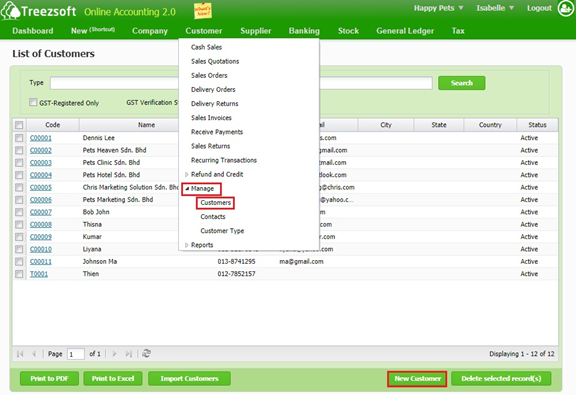
Search - Enter a keyword to Search for a particular customer. Or click on the hyperlinked code to view details.
Print to PDF - Print the customer list as PDF.
Print to Excel - Print the customer list as excel file.
Import Customers - Import customers list based on a formatted file provide by TreezSoft.
Delete selected record(s) - Delete a selected record.
Enter the details and click on "Save" to confirm and proceed.
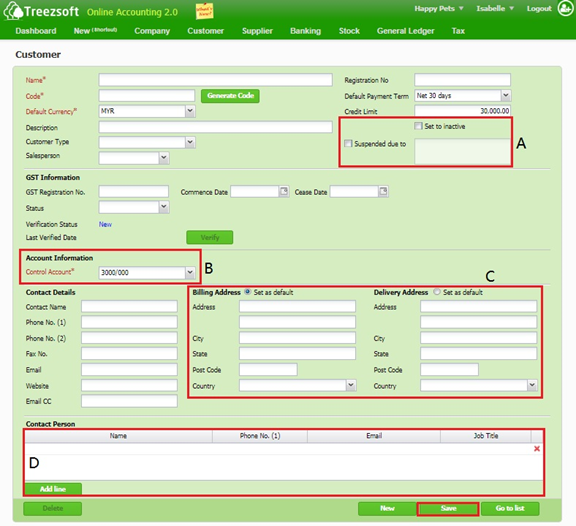
A - If you want to deactivate a customer’s status, mark the Set to inactive box. You can only delete a customer, which does not have any transactions if a customer is no longer in use.
If you want to suspend a customer’s status, mark the Suspended due to box.
B - Account information is very important. Make sure you have selected a control account correctly. Make sure you customer’s control account is always 3000/000 (Debtors Control Account) by default. You can change the account default in Preference.
C - Enter the contact details in this section. There are two types of addresses you can enter: Billing Address and Delivery Address. You can set either one of them to be the default address.
D - You can add or assign a contact person specifically to the customer. Add line if there is more than one contact person.
Fields marks with asterisk (*) are required fields.
You can visit these links to read more about customers in TreezSoft:
TreezSoft is a cloud accounting software for Small and Medium-sized Enterprises (SMEs). It allows you to access your financial information anytime, anywhere. It also allows you to have unlimited users for FREE for your account in TreezSoft. Our aim is to help reduce our clients' time spent on accounting mainly by using our automated processes and integration to help increase their company effeciency at a minimum costs. SMEs can use TreezSoft to keep track their expenses, accounts, daily operation e.g. Point of Sales (namely QPOS) system and etc.
Visit TreezSoft at http://www.treezsoft.com/ to sign up for a 30 days trial account with us!
You can also email us at [email protected] for more enquiries