Logo
  • Ciri-ciri
  • Harga
  • Sokongan
  • Hubungi
  • Blog
  • E-Invois
  • Tentang
  • Integrasi
  • API
  • Tentang Integrasi API
  • Log Masuk
    Perakaunan
    Poin Jualan (POS) Pesanan Kerja
Warning! Payment is due for the implementation of this System. Please refer to the Product Detail page.
Warning!

How to enable rounding adjustment (only for Cash Sales)?

Diterbitkan Oleh  jess  pada  Mar 26 2018 13:10        3602


Rounding is an act of reducing or increasing the number of decimals to the nearest numerical value. Rouding adjustment serve the same purpose, to round up to the nearest value, either up or down. In accounting, differences due to rounding adjustment needs to be recorded as well. 

Rounding adjustment in TreezSoft

Recording all rounding adjustment is a time consuming and less effective work. In TreezSoft cloud accounting, rounding adjustment will be done automatically by our system and the adjustment will be recorded to the specific account according to your preferences. 

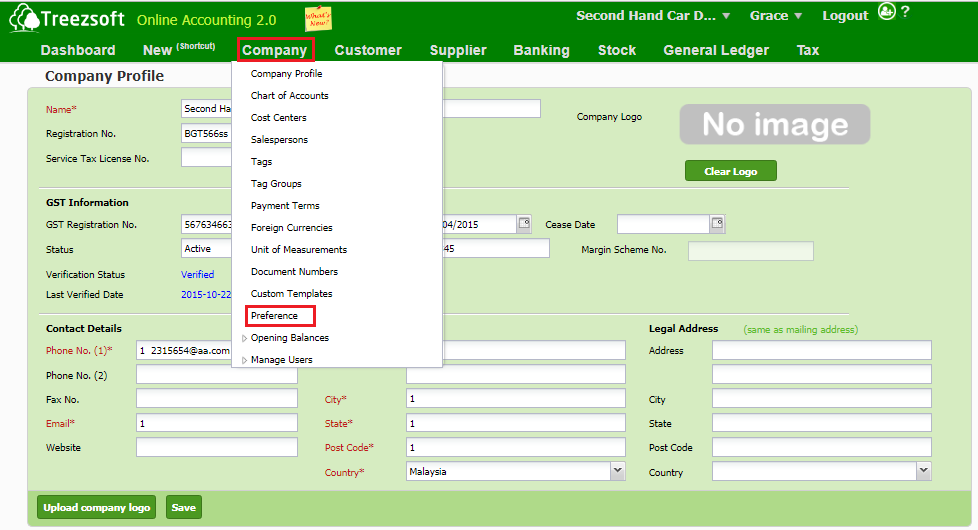
To easily enable and set yoru preferred account for rounding adjustment, navigate through: Company > Preference.
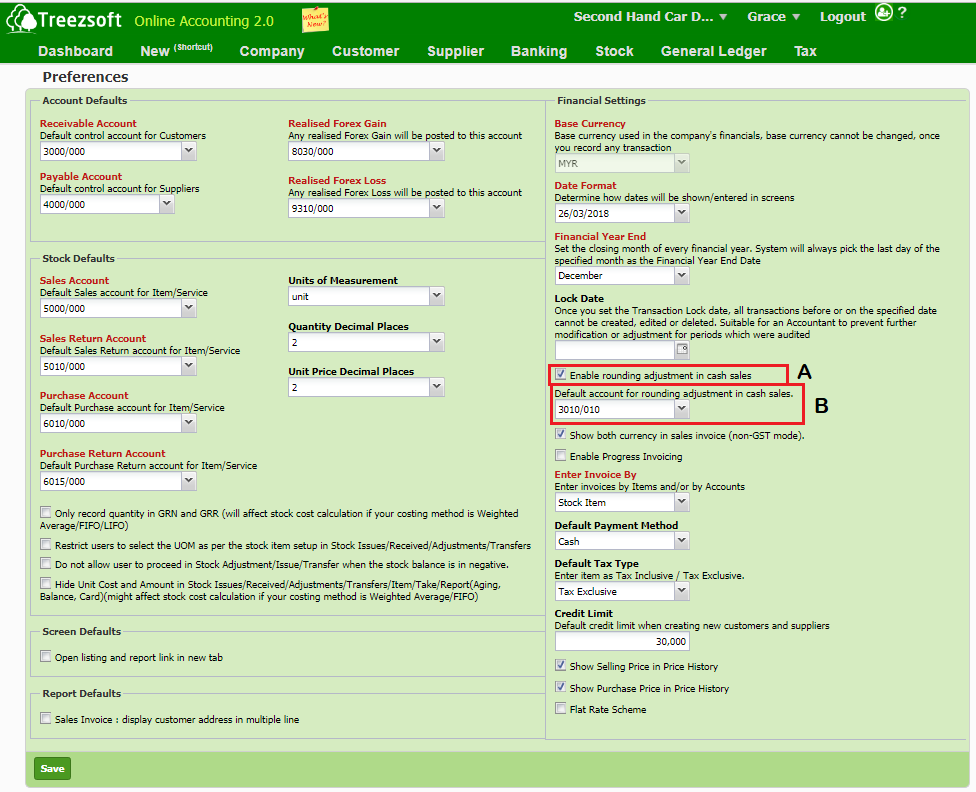
Tick the box at A and determine the default rounding account for your rounding adjustment at B.
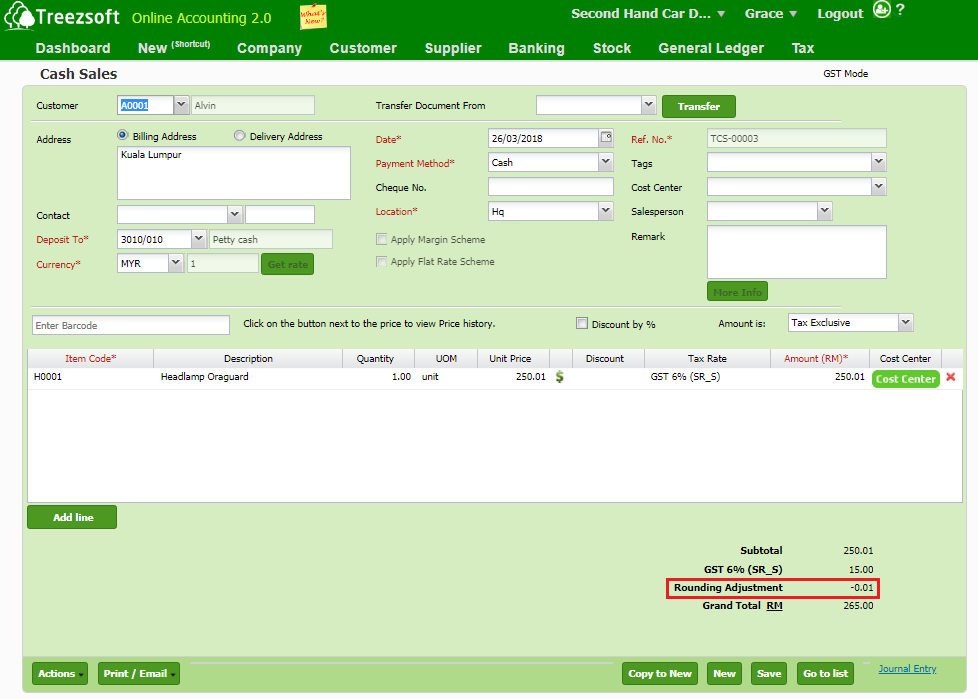
You can check your rounding adjustment at the bottom of your cash sales entry. 
You can read more on preferences in TreezSoft by visiting these links: 

  • How to choose paper size for my targeted documents? 
  • How to edit my preferences?
  • How to restrict procession in Stock Adjustment/Issue/Transfer when stock balance is negative? 
  • How to customize document template (For Sales Invoice only)?
  • How to verify GST Preference?

TreezSoft is a cloud accounting software for Small and Medium-sized Enterprises (SMEs). It allows you to access your financial information anytime, anywhere. It also allows you to have unlimited users for FREE for your account in TreezSoft. Our aim is to help reduce our clients' time spent on accounting mainly by using our automated processes and integration to help increase their companyeffeciency at a minimum costs. SMEs can use TreezSoft to keep track their expenses, accounts, daily operation e.g. Point of Sales (namely QPOS) system and etc. 

Visit TreezSoft at http://www.treezsoft.com/ to sign up for a 30 days trial account with us! 

You can also email us at [email protected] for more enquiries.


Kata Kunci cash sales rounding adjustment

Terkini

Mengapa Treezsoft adalah Penyelesaian Perakaunan Awan yang Ideal untuk Negara-Negara yang Mengamalkan IFRS Langkah Mudah untuk Membuat Konsolidasi e-Invois Cara Menetapkan Kod Klasifikasi eInvois Pengeluaran Invois untuk Perniagaan Optik Boost Efficiency & Control with Treezsoft’s Sales Person Setup Feature

Berkaitan

How to record Barter trades (stock exchange) in transaction? Functionality of customer module in Treezsoft Langkah Mudah untuk Membuat Konsolidasi e-Invois How to create Credit Note for Cash Sales? Rekod lebihan bayar pada jualan tunai How to create refunds on cash sales? Ways to use Treezsoft - The Service Industries How to create cash sales/simplified tax invoice? Langkah Mudah untuk Membuat dan Mengemas Kini e-Invois Standard dan e-Invois Pengebilan Sendiri
Tentang Tentang
  • Tentang Kami

Produk Produk
  • E-Invois
  • Ciri-ciri
  • Harga

Sumber Sumber
  • Sokongan
  • Blog
  • API
  • Soalan Lazim

Langgan Kami Langgan Kami
  • Daftar
  • Hubungi Kami

  
 [email protected]
 +6012-787 5077
  • playstore
Logo
� Hak Cipta - TreezSoft.com. Semua hak cipta terpelihara.
Waktu Operasi: Isnin-Jumaat 9am-5pm Terma Penggunaan    |    Privasi  |    Peta Laman

Alert Message

0%

Confirm Message