Logo
  • Features
  • Pricing
  • Support
  • Contact
  • Blog
  • E-Invoicing
  • About
  • Integration
  • API
  • About Integration API
  • Login
    Accounting
    Point Of Sales (POS) Job Order
Warning! Payment is due for the implementation of this System. Please refer to the Product Detail page.
Warning!

How to restrict procession in Stock Adjustment/Issue/Transfer when stock balance is negative?

Posted By  jess  at  Mar 26 2018 14:58        2917


TreezSoft cloud accounting is able to help our users with stock management. TreezSoft also have automatic synchronization to our Point of Sales (QPOS) system to make stock management much convenient for you. Furthermore, being cloud-based accounting software, you can be sure that the stock amount that you see everytime is the most updated amount. You can also easily generate accurate stock report with TreezSoft.

You can even set to restrict stock adjustment, issue or transfer when the stock is in negative. In this way, you can better manage your stocks. 

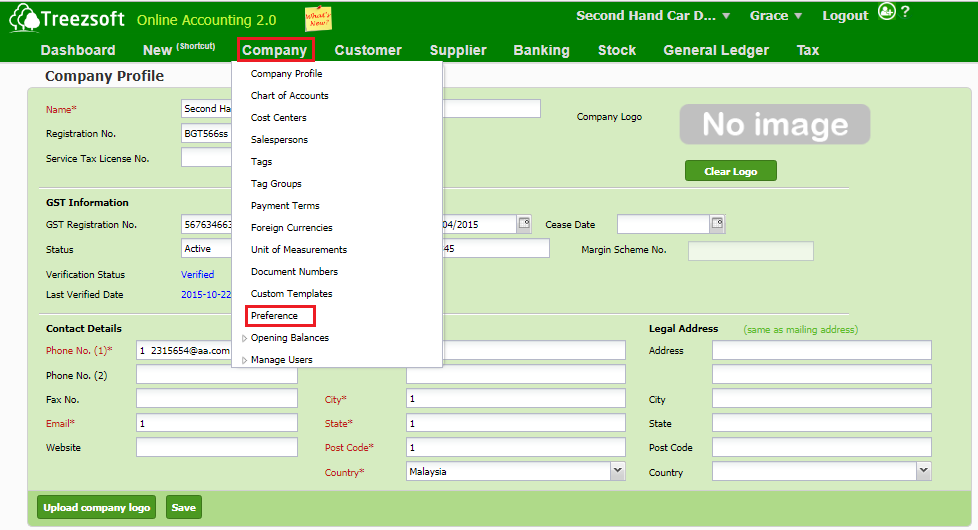
If you do not want to allow users to proceed in Stock Adjustment/Issue/Transfer when the stock balance is in negative, navigate through: Company > Preference. 
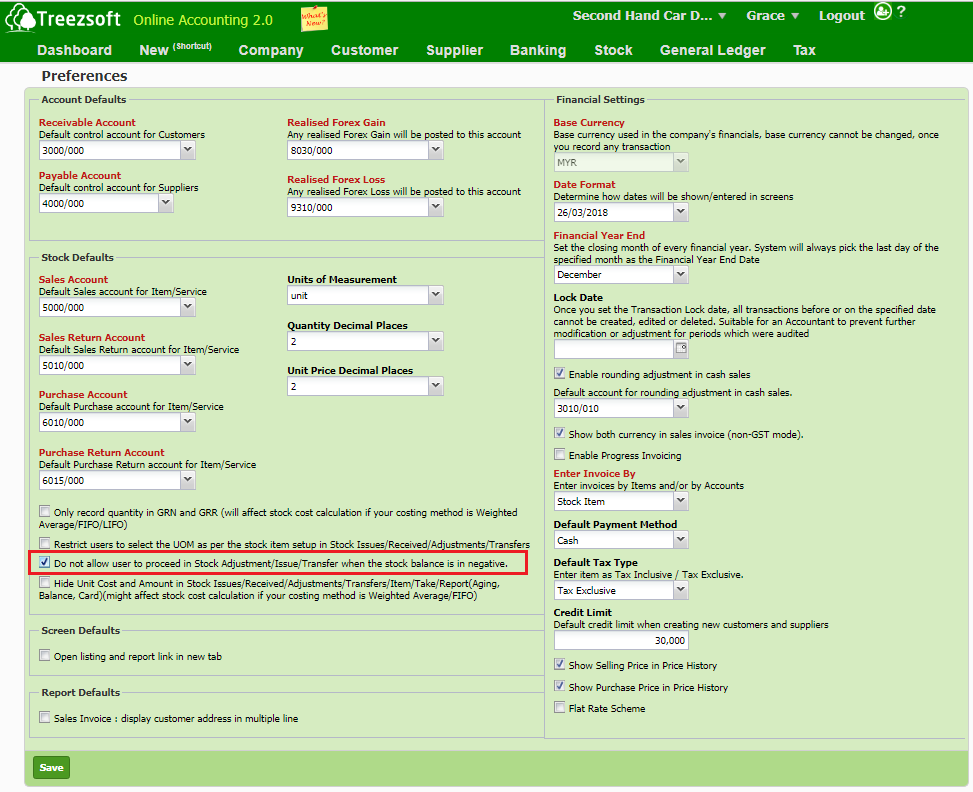
Tick the third box that states 'Do not allow user to proceed in Stock Adjustment/Issue/Transfer when the stock balance is in negative'. 
You can read more on preferences in TreezSoft by visiting these links: 

  • How to choose paper size for my targeted documents? 
  • How to edit my preferences?
  • How to restrict procession in Stock Adjustment/Issue/Transfer when stock balance is negative? 
  • How to customize document template (For Sales Invoice only)?
  • How to verify GST Preference?

TreezSoft is a cloud accounting software for Small and Medium-sized Enterprises (SMEs). It allows you to access your financial information anytime, anywhere. It also allows you to have unlimited users for FREE for your account in TreezSoft. Our aim is to help reduce our clients' time spent on accounting mainly by using our automated processes and integration to help increase their companyeffeciency at a minimum costs. SMEs can use TreezSoft to keep track their expenses, accounts, daily operation e.g. Point of Sales (namely QPOS) system and etc. 

Visit TreezSoft at http://www.treezsoft.com/ to sign up for a 30 days trial account with us! 

You can also email us at [email protected] for more enquiries.


Keyword stock stock quantity stock adjustment

Recent

Why Treezsoft is the Ideal Cloud Accounting Solution for IFRS-Adopting Countries Simple Steps to Create Consolidated eInvoices How to Assign eInvoice Classification Code Invoicing for Optical Business Boost Efficiency & Control with Treezsoft’s Sales Person Setup Feature

Related

How to upload physical worksheet for stock take? How to set different price level for stock items in Treezsoft? Stock Batches What's are the usage of Selling Price, Purchase Price, and Standard Cost in Stock Module? How to enter Withholding Tax in TreezSoft How to set up stock batch in TreezSoft? How to check the serial numbers status in Treezsoft? How to enter my opening balance? - Items - opening balances (5/5) How to do stock adjustment in Treezsoft? How to edit and create stock category? How to check which stock item to restock in TreezSoft? Ways to use Treezsoft - The Service Industries How to set the stock level for stock reorder advice report? Functionality of stock module in Treezsoft
About About
  • About Us

Product Product
  • E-Invoicing
  • Features
  • Price

Resource Resource
  • Support
  • Blog
  • API
  • FAQ

Subscribe Us Subscribe Us
  • Sign Up
  • Contact Us

  
 [email protected]
 +6012-787 5077
  • playstore
Logo
© Copyright - TreezSoft.com. All rights reserved.
Hours: Mon-Fri 9am-5pm Term of use    |    Privacy      |    Site Map

Alert Message

0%

Confirm Message