Stock groups helps you to organize your stock types better. You can group stock types to multiple groups in TreezSoft cloud accounting software. TreezSoft is highly flexible to fit to different users' needs.
Later on, you can easily generate stock reports on different stock groups according to your requirement. TreezSoft uses integration and automation to ensure accurate and up-to-date information being displayed to our users. Therefore, you can be sure that all information you view on your reports are always accurate at that point of time.
To create a new stock group, navigate through: Stock > Manage > Stock Groups. Click on the “New Stock Group” button at the bottom right corner. Enter the details and click on "Save" to confirm and proceed.
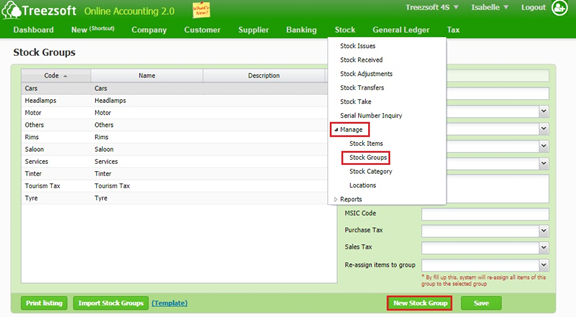
1. This screen shows the full list of stock groups you have created.
2. To create a stock group, click on New Stock Group. Fields mark with asterisk (*) are required fields.
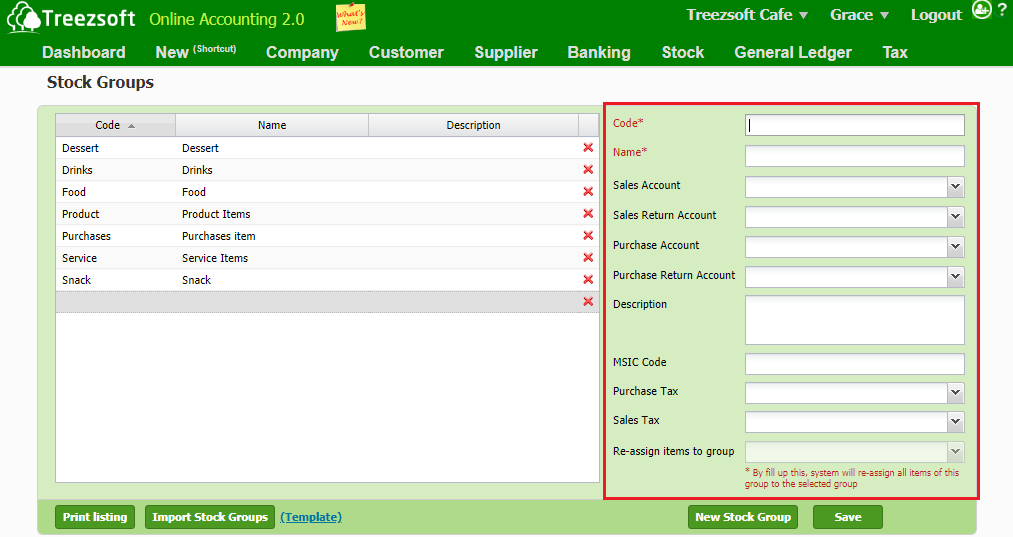
It is advisable to enter the control account(s) for the particular stock group you have created before you assigned them to your stock items.
3. To edit a particular stock group, select the stock group and you can edit on the right.
Fields marks with asterisk (*) are required fields.
You can visit these links to read more about stock modules in TreezSoft:
TreezSoft is a cloud accounting software for Small and Medium-sized Enterprises (SMEs). It allows you to access your financial information anytime, anywhere. It also allows you to have unlimited users for FREE for your account in TreezSoft. Our aim is to help reduce our clients' time spent on accounting mainly by using our automated processes and integration to help increase their company effeciency at a minimum costs. SMEs can use TreezSoft to keep track their expenses, accounts, daily operation e.g. Point of Sales (namely QPOS) system and etc.
Visit TreezSoft at http://www.treezsoft.com/ to sign up for a 30 days trial account with us!
You can also email us at [email protected] for more enquiries