In today's fast-paced digital world, businesses are increasingly turning to electronic invoicing (eInvoice) to streamline their billing processes, reduce errors, and enhance efficiency. Enabling the eInvoice feature in TreezSoft can significantly simplify your financial operations and ensuring compliance with regulatory standards.
In Malaysia, the Inland Revenue Board (LHDN) has introduced specific requirements for eInvoices to enhance the efficiency of the country's tax administration. A valid eInvoice must include essential information such as the supplier’s name and address, invoice number and date, description of goods or services provided, and the total amount payable. The implementation of eInvoicing will be rolled out in phases, starting from August 1, 2024, for businesses with annual sales exceeding RM100 million, and gradually extending to other businesses by July 1, 2025.
This guide will walk you through the initial steps to activate and configure the eInvoice feature in TreezSoft, helping you transition smoothly to a more modern and efficient invoicing system.
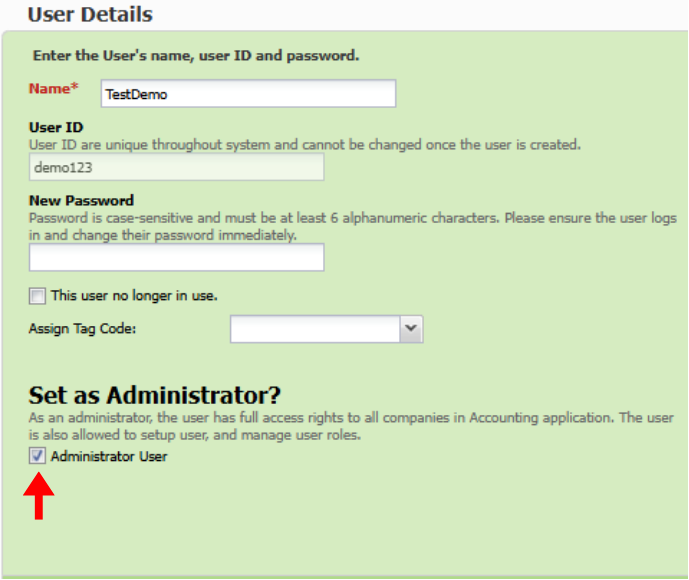
Before setting up eInvoice Integration, please ensure login the system using ID with Administrator role as this process is accessible only to users with Administrator privileges.
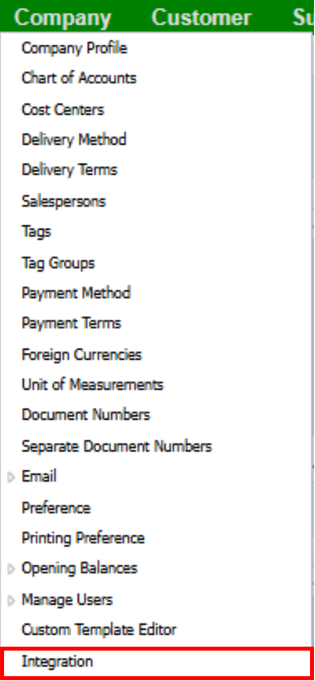
1. Once logged in, navigate to menu Company > Integration.
2. Toggle on the eInvoice integration.

3. Click on the settings icon to begin the eInvoice onboarding setup process.

4. Below are the detailed steps to configure eInvoice Integration:
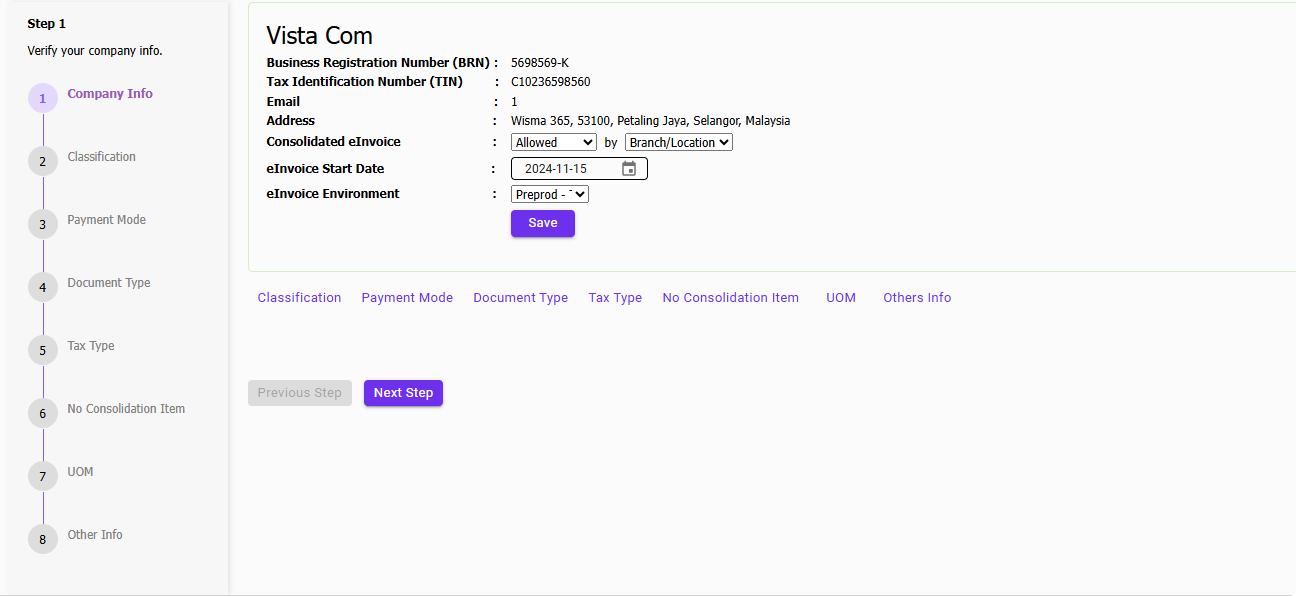
Step 1: Configure Company eInvoice Info
Set up the necessary eInvoice information for your company, ensuring all required details are accurately filled in.
If your business nature is not allowed to issue consolidated eInvoice, please select "Not Allowed".
Enter the date when you will start issuing eInvoices..
If you would like to start with a trial, please select "Preprod - Trial" as your eInvoice environment.
If you would like to skip the trial and start issue actual eInvoice, please select "Prod - Actual" as your eInvoice environment.
Note: If you haven't add TreezSoft as your Intermediary, please refer E-Invoice - How to add Treezsoft as Intermediary at Your MyInvois Portal - Treezsoft Blog
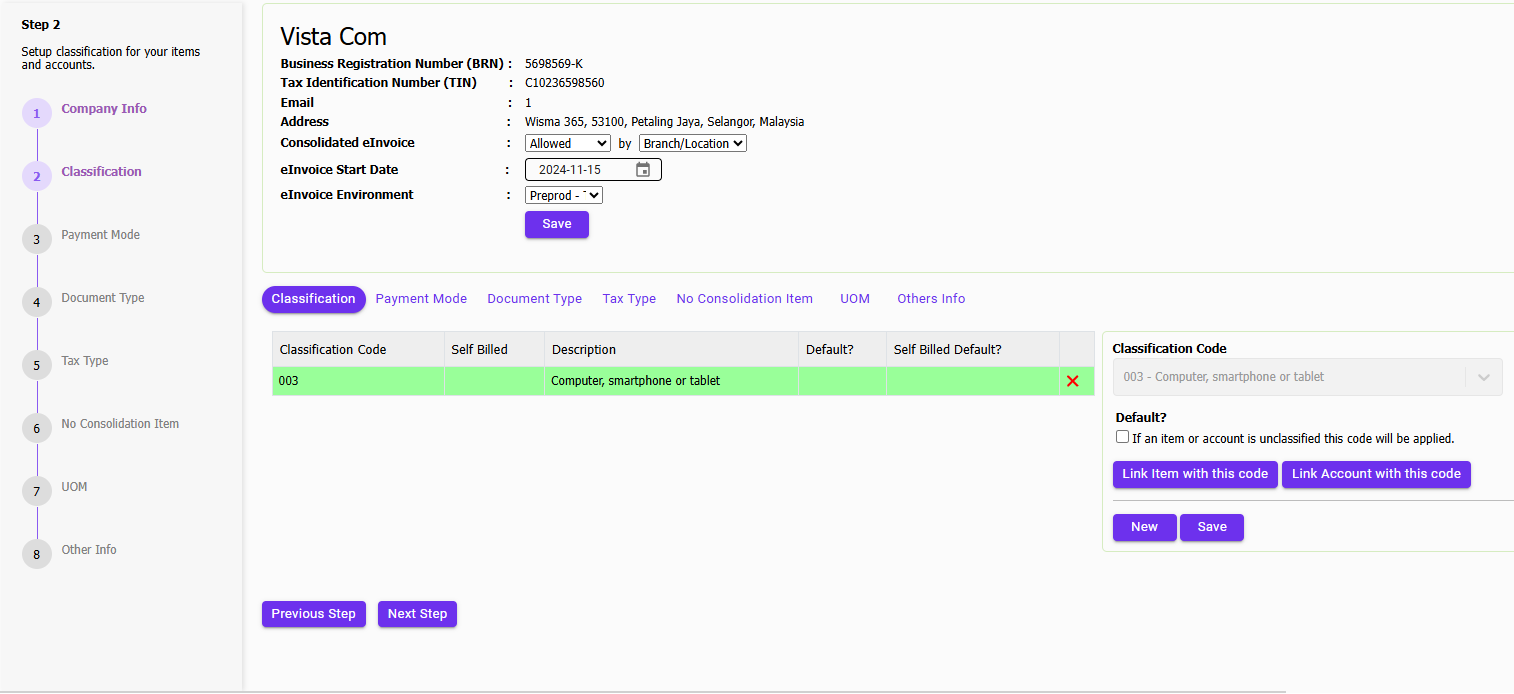
Step 2: Configure Classification by Item and Account
Assign appropriate classifications to your items and accounts to enable proper categorization for eInvoice generation.
Select a Classification Code, save and click on either "Link Item with this code" or "Link Account with this code" to classify your items and accounts.
Step 3: Map Payment Modes
As eInvoice have own payment mode, please match your payment method to eInvoice payment mode accordingly.
You can also click on 'Auto Match' to let the system attempt to match the code automatically. Alternatively, you can manually map the code as needed.

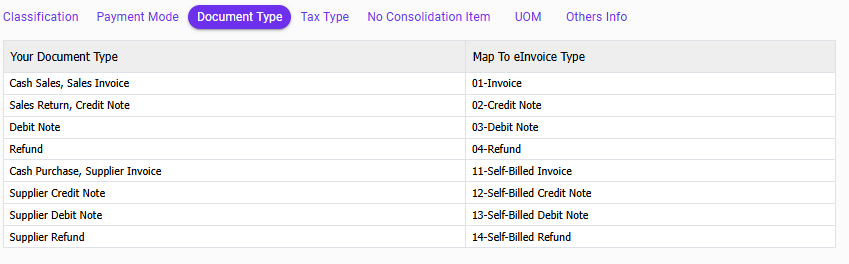
Step 4: Map Document Types
No action needed, this page indicate how TreezSoft transaction mapped to eInvoice Type.
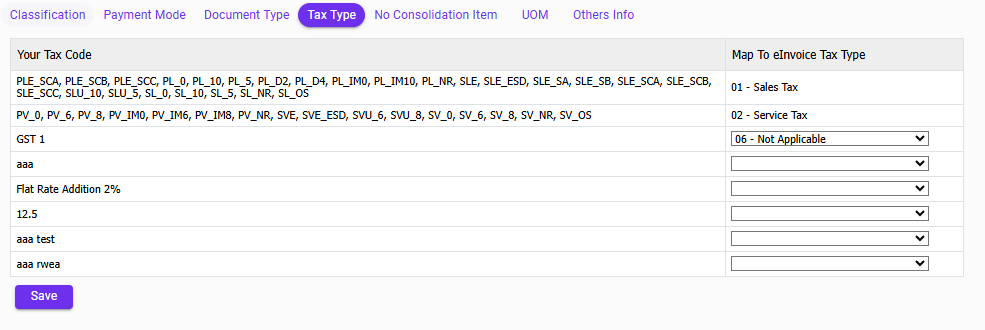
Step 5: Map Tax Codes
Ensure each tax code is mapping to their respective eInvoice tax types.
TreezSoft will map Sales Tax and Service Tax automatically if they are enabled.
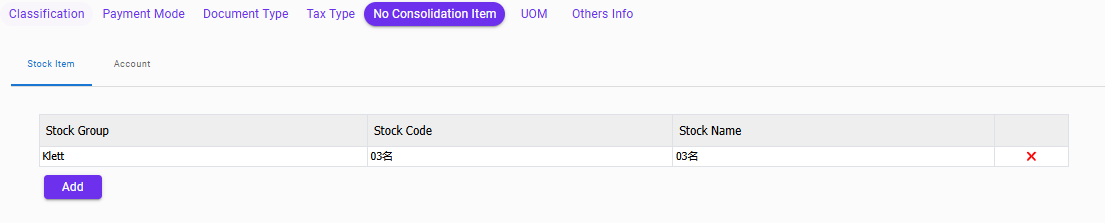
Step 6: Configure Restricted Items
If you have items that cannot be issued using a consolidated eInvoice, please configure them here so that TreezSoft will exclude them when creating the consolidated eInvoice. The same goes for accounts.
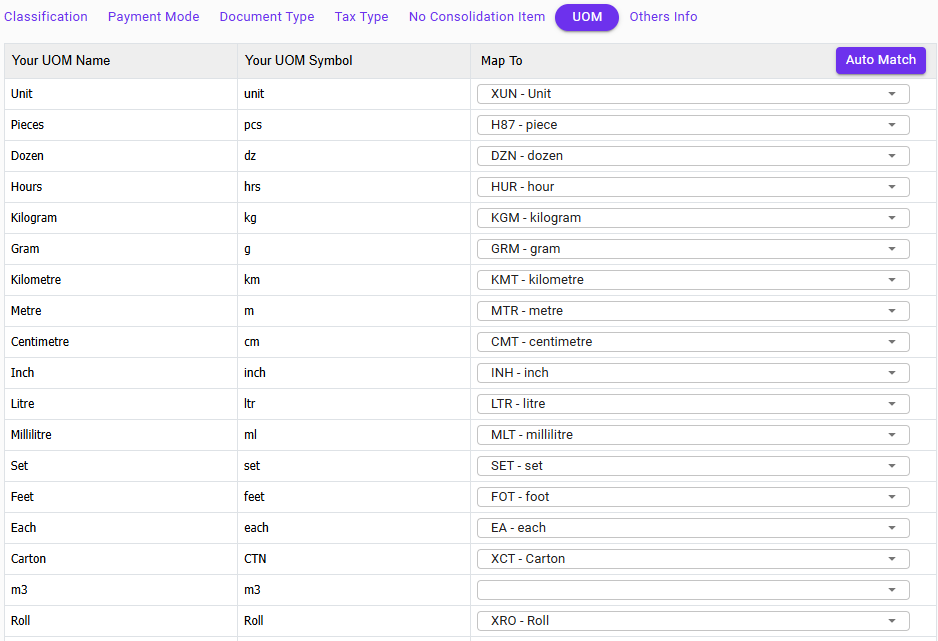
Step 7: Map Units of Measurement (UOM)
Match each unit of measurement to its standardized eInvoice equivalent.
You can also click on 'Auto Match' to let the system attempt to match the UOM automatically. Alternatively, you can manually map the UOM as needed.
Step 8: Other References
No action needed. This section allows you to view definition of other code tables for reference purposes.

To explore how TreezSoft Cloud Accounting can transform your financial operations into a compliant and streamlined process, connect with us for a free demonstration today at [email protected] or WhatsApp us now!
Transition to TreezSoft Cloud Accounting
Embrace the digital shift with TreezSoft Cloud Accounting, your seamless solution for LHDN E-Invoicing compatibility. As the era of digital taxation dawns, TreezSoft Cloud Accounting stands ready to guide businesses through the E-Invoicing transition, providing robust, user-friendly software solutions. Starting August 1, 2023, purchasers of TreezSoft solutions will gain complimentary access to the E-Invoice module until 2028, underscoring our commitment to affordable, efficient tax compliance.
Join the Future of Accounting Today
Don't let your business fall behind. Embrace the future of accounting with TreezSoft. Sign up today and be among the first to experience the efficiency and convenience of our e-invoice feature. With TreezSoft Cloud Accounting, you're not just keeping up with the times; you're setting the pace.
TreezSoft is a cloud accounting software for Small and Medium-sized Enterprises (SMEs). You can access your financial information anytime, anywhere and we use automated processes and integration to promote efficiency in your accounting process and financial health management. You can also create unlimited users for FREE for your account in TreezSoft.
Visit TreezSoft at http://www.treezsoft.com/ to sign up for a 30 days trial account with us!
Follow our Facebook Page for more updates: https://www.facebook.com/TreezSoft
You can also email us at [email protected] for more inquiries.