Logo
  • Ciri-ciri
  • Harga
  • Sokongan
  • Hubungi
  • Blog
  • E-Invois
  • Tentang
  • Integrasi
  • API
  • Tentang Integrasi API
  • Log Masuk
    Perakaunan
    Poin Jualan (POS) Pesanan Kerja
Warning! Payment is due for the implementation of this System. Please refer to the Product Detail page.
Warning!

Stock Batches

Diterbitkan Oleh  jess  pada  Dec 13 2021 14:59        3824


What is Stock Batch? 

Stock batch represents a number of stocks that were received on a specific date, at a specific cost. It may also include other details like the types of materials used to manufacture the item, the colour that was used to paint an item, or the expiry dates of the products.

Why is tracking Stock Batch important?

It is important to know the differences in products that you are selling to your customers.

Stock batch will allow you to:

  • Track product expiry dates
  • Track differences between products (e.g. materials used, colour used to paint an item)
  • Answer questions asked about the differences between products
  • Analyze return rates for a specific batch
  • More accurate reporting on stock related information (e.g. profit margin, revenue)

You can also set up specific strategies such as FIFO, LIFO when issuing stocks.

Stock batch tracking with TreezSoft

Accurate stock management is important for product-based businesses. In TreezSoft, we allow you to flexibly choose which stock batch you want to issue the stock to each customer (refer to the image below for example) allowing more accurate stock tracking. 
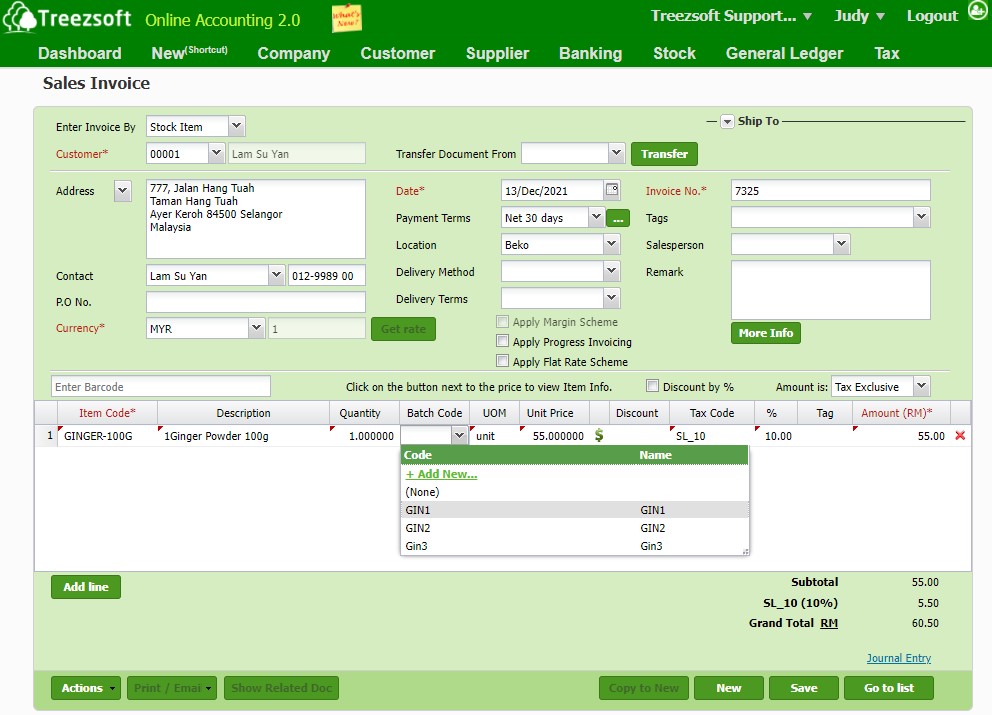
TreezSoft real-time stock batch tracking is always up-to-date. You can easily generate accurate reports on your stock items.

You can know more about how to create stock batches in TreezSoft by referring to this blog. 


You can read more on related topics in the TreezSoft blog:

  • Stock Reports in Treezsoft

  • How to manage stock groups in Treezsoft?

  • How to create or edit stock items in Treezsoft?

  • What is the difference between entering invoice by Stock Item and Account?

  • How to record Barter trades (stock exchange) in transactions?

  • The Functionality of stock module in Treezsoft

  • How to set different price levels for stock items in Treezsoft?

TreezSoft is a cloud accounting software for businesses - regardless of what kind of business you are. It allows you to access your financial information anytime, anywhere. It also allows you to have unlimited users for FREE for your account in TreezSoft. We would like to be long-term partners of your business - to reduce our clients' time spent on accounting mainly by using our automated processes and integration to help increase their company efficiency at minimum costs and expand your business together with Treezsoft. 

Visit TreezSoft at http://www.treezsoft.com/ to sign up for a 30 days trial account with us now!

You can also email us at [email protected] for more inquiries.


Kata Kunci Stock Batch stock item stock FIFO stock level

Terkini

Mengapa Treezsoft adalah Penyelesaian Perakaunan Awan yang Ideal untuk Negara-Negara yang Mengamalkan IFRS Langkah Mudah untuk Membuat Konsolidasi e-Invois Cara Menetapkan Kod Klasifikasi eInvois Pengeluaran Invois untuk Perniagaan Optik Boost Efficiency & Control with Treezsoft’s Sales Person Setup Feature

Berkaitan

How to enter stock items in Treezsoft? How to upload physical worksheet for stock take? What is the difference between enter invoice by Stock Item and Account? How to set different price level for stock items in Treezsoft? How to restrict procession in Stock Adjustment/Issue/Transfer when stock balance is negative? How to bulk update stock items? What's are the usage of Selling Price, Purchase Price, and Standard Cost in Stock Module? How to enter Withholding Tax in TreezSoft How to set up stock batch in TreezSoft? How to create or edit stock items in Treezsoft? What are the differences between the Costing Methods? Why some of the sales showing loss in the Stock Profitability report? How to check the serial numbers status in Treezsoft? How to enter my opening balance? - Items - opening balances (5/5) How to do stock adjustment in Treezsoft? Stock group/item functionality in Treezsoft How to import stock items in Treezsoft? How to edit and create stock category? How to check which stock item to restock in TreezSoft? Ways to use Treezsoft - The Service Industries How to set the stock level for stock reorder advice report? Functionality of stock module in Treezsoft How to import stock item listing?
Tentang Tentang
  • Tentang Kami

Produk Produk
  • E-Invois
  • Ciri-ciri
  • Harga

Sumber Sumber
  • Sokongan
  • Blog
  • API
  • Soalan Lazim

Langgan Kami Langgan Kami
  • Daftar
  • Hubungi Kami

  
 [email protected]
 +6012-787 5077
  • playstore
Logo
� Hak Cipta - TreezSoft.com. Semua hak cipta terpelihara.
Waktu Operasi: Isnin-Jumaat 9am-5pm Terma Penggunaan    |    Privasi  |    Peta Laman

Alert Message

0%

Confirm Message