Sometimes you may realize you've mistakenly created a sales invoice, be it duplicated or its cancelled after its issued. You may want to delete the targeted sales invoice in your account with TreezSoft cloud accounting software.
Please note that you cannot delete any documents or records if your GST mode is activated. This is to be compliance to the rules and regulations of GST.
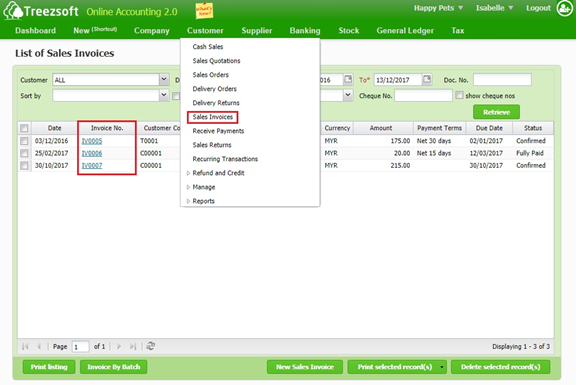
To delete or void sales invoice, navigate through: Customer > Sales Invoices. Click on the hyperlinked Invoice No. that you want to delete or void.
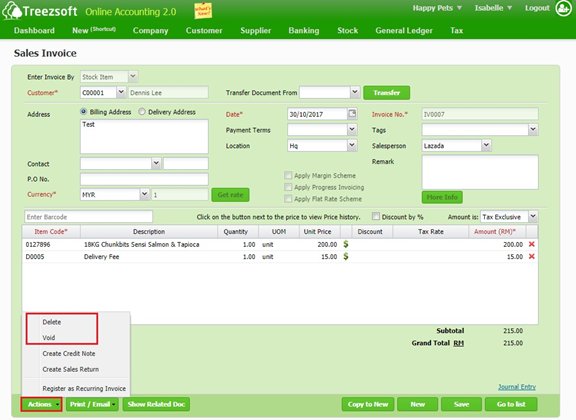
Click on Action >"Delete" or "Void" to delete or void the sales invoice.
When to delete or void an invoice?
This depends entirely on the accountant and the business operations, some businesses do not allow any deletion of invoices to maintain a proper audit trail of invoices.
Another typical interpretation would be to only delete if the invoice has not been sent to your customer and void, if it has been sent out.
You can read more on invoices in TreezSoft by visiting these links:
TreezSoft is a cloud accounting software for Small and Medium-sized Enterprises (SMEs). It allows you to access your financial information anytime, anywhere. It also allows you to have unlimited users for FREE for your account in TreezSoft. Our aim is to help reduce our clients' time spent on accounting mainly by using our automated processes and integration to help increase their company effeciency at a minimum costs. SMEs can use TreezSoft to keep track their expenses, accounts, daily operation e.g. Point of Sales (namely QPOS) system and etc.
Visit TreezSoft at http://www.treezsoft.com/ to sign up for a 30 days trial account with us!
You can also email us at [email protected] for more enquiries