Logo
  • Features
  • Pricing
  • Support
  • Contact
  • Blog
  • E-Invoicing
  • About
  • Integration
  • API
  • About Integration API
  • Login
    Accounting
    Point Of Sales (POS) Job Order
Warning! Payment is due for the implementation of this System. Please refer to the Product Detail page.
Warning!

What's are the usage of Selling Price, Purchase Price, and Standard Cost in Stock Module?

Posted By  admin  at  May 07 2019 15:46        3267


In our FAQ Series Episode 3, let's talk about Treezsoft Stock Module! 
Question: 

What's the selling price, purchase price and standard cost in Treezsoft's Stock Module? 
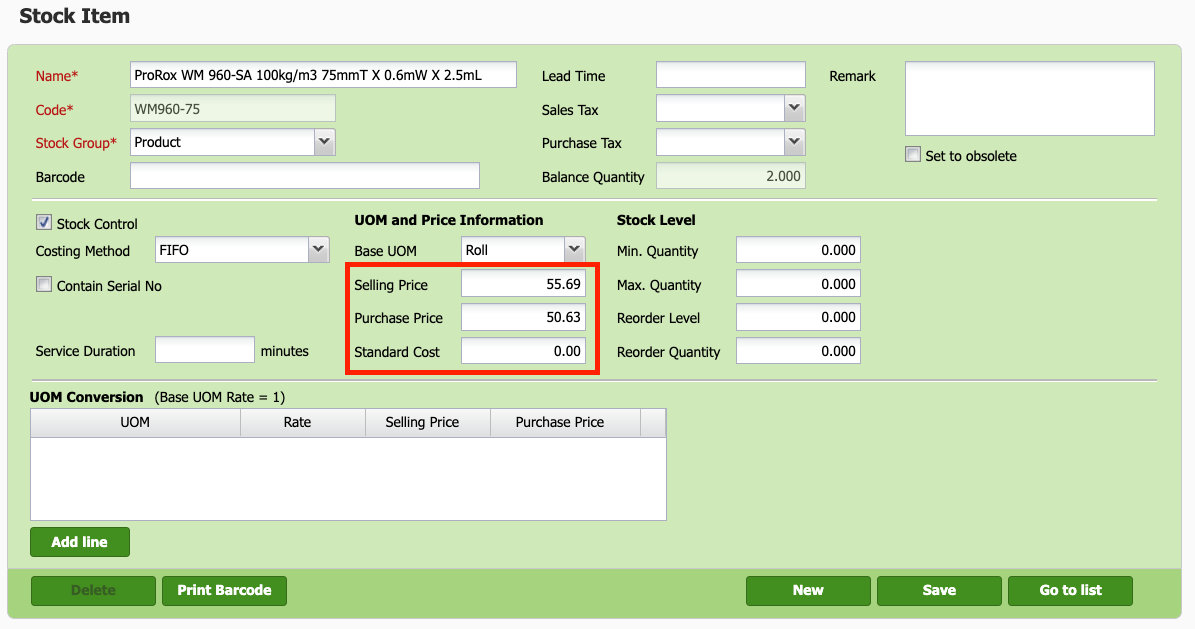
Selling Price

Default selling price that will appear after the item being selected in sales related transaction e.g. Sales Invoice, POS system. This shall allow users to set all the items with their desired selling price without worrying to re-key in on this. 

If you wish to amend the default selling price at the transactional screen e.g. invoice, cash sales, you can always update your desired selling price at the transactional screen. 

We would also like to highlight in Treezsoft, we have another cool feature which called Treezsoft Price Level,  allows user to set multiple price to stock item based on their customer type. 

Purchase Price

Default purchase price that will appear after the item being selected in purchase related transaction e.g. Supplier Invoice. This reduces the time consumed in data entry - thus increase efficiencies across all transaction records.  

Same goes to the selling price, if you wish to amend the default purhcase price in your purchase related transactions, you could always update to the value that shows in your documents. 

Standard Cost

Unlike Selling/Purchase Price, this value will not be defaulted at any transaction, however it will be used to calculate “Cost” (e.g. Total Cost, Balance Cost) in Stock related reports, IF the item’s Costing Method is set to “Fixed Cost”.

Next blog, we will talk about the Costing Method in Treezsoft. Stay Tuned! 


You can visit these links to read more about stock items in TreezSoft:

  • Why stock on hand value shows Zero (0) in P&L and Balance Sheet?

  • How to import stock items in Treezsoft?

  • How to create or edit stock items in Treezsoft?

  • How to enter my opening balance? - Items - opening balances (5/5)

  • Tracking Cost of Goods Sold

You can also read more on other financial report in TreezSoft by visiting these links: 

  • The measurement of the company's success

  • The magic in managing your financial health

  • Cash is King? All you need to know about Cash Flow Statement

TreezSoft is a cloud accounting software, it allows you to access your financial information anytime, anywhere. It also allows you to create unlimited users for FREE for your account in TreezSoft.  

Visit TreezSoft at http://www.treezsoft.com/ to sign up for a 30 days trial account with us! 

You can also email us at [email protected] for more enquiries.


Keyword FAQ stock

Recent

Why Treezsoft is the Ideal Cloud Accounting Solution for IFRS-Adopting Countries Simple Steps to Create Consolidated eInvoices How to Assign eInvoice Classification Code Invoicing for Optical Business Boost Efficiency & Control with Treezsoft’s Sales Person Setup Feature

Related

How to upload physical worksheet for stock take? How to set different price level for stock items in Treezsoft? Tips to find out why the figure of debtor/creditor account not tally with aging How to restrict procession in Stock Adjustment/Issue/Transfer when stock balance is negative? Stock Batches How to enter Withholding Tax in TreezSoft How to set up stock batch in TreezSoft? How to check the serial numbers status in Treezsoft? How to enter my opening balance? - Items - opening balances (5/5) How to do stock adjustment in Treezsoft? How to edit and create stock category? How to check which stock item to restock in TreezSoft? Ways to use Treezsoft - The Service Industries How to set the stock level for stock reorder advice report?
About About
  • About Us

Product Product
  • E-Invoicing
  • Features
  • Price

Resource Resource
  • Support
  • Blog
  • API
  • FAQ

Subscribe Us Subscribe Us
  • Sign Up
  • Contact Us

  
 [email protected]
 +6012-787 5077
  • playstore
Logo
© Copyright - TreezSoft.com. All rights reserved.
Hours: Mon-Fri 9am-5pm Term of use    |    Privacy      |    Site Map

Alert Message

0%

Confirm Message